

What is Image Converter?
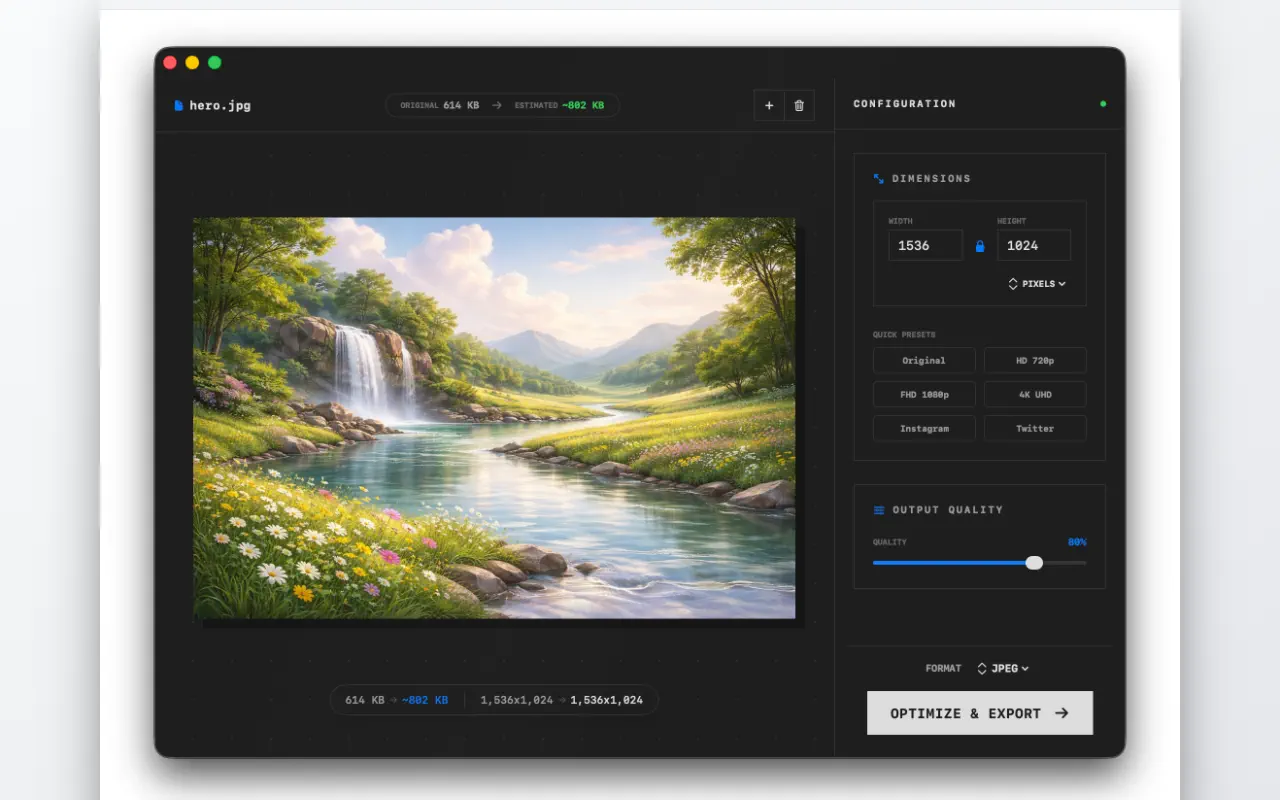
Image Converter is the fast, all-in-one image conversion and processing tool built exclusively for Mac. Convert between every major format in seconds, batch-process hundreds of files at once, resize and optimize with full control, and build multi-page PDFs from images — all locally, without uploading a single byte.
If you've ever airdropped a dozen HEIC photos from your iPhone and needed them as JPG for a form, or tried to compress a WebP pack for a web project and ended up on five different ad-infested online converters, this is the tool that should have existed on macOS by default.
The problem
Image format conversion on Mac is surprisingly awkward for a platform with excellent image-processing primitives baked into the OS.
- Preview can export to a handful of formats, but not HEIC → WebP, not PSD → JPG, and not in batches
- Automator workflows are powerful, but documentation is scarce and the setup overhead is high
- Online converters (cloudconvert, tinypng, et al.) upload your images to a third party, cap file sizes, and throttle free users
- Terminal tools (ImageMagick, sips) work but require shell fluency most users don't have
The gap: a native, batch-ready, format-complete converter with a clean UI.
What it does
- Convert between every major format: HEIC ↔ JPG ↔ PNG ↔ WebP ↔ TIFF ↔ GIF ↔ SVG ↔ EPS ↔ PSD
- Batch-convert hundreds of files via drag-and-drop
- Create multi-page PDFs from images or scanned documents
- Resize by pixels, percentage, preset, or custom dimensions
- Lock aspect ratio automatically
- Adjust JPEG quality and chroma subsampling for smaller files without visible loss
- Rotate, adjust brightness/contrast/saturation before export
- Preserve or strip EXIF metadata (including GPS coordinates for privacy)
- Keep original color profiles or convert to sRGB for web
- Custom file naming: prefix, suffix, sequential numbering
- Live preview of output size and compression savings
How it works
Image Converter is a native Mac app built on ImageIO and CoreGraphics — the same frameworks Preview and Finder use internally. That's why format coverage is complete: if macOS can read the input, the converter can read it too. And if macOS can write the output, the converter can write it.
Conversions run on every available CPU core. A 200-photo HEIC → JPG batch on an M2 Mac finishes in a couple of seconds. Nothing is uploaded, so there's no upload-wait, no download-wait, and no privacy tradeoff when you're processing client work or personal photos.
Who it's for
- iPhone users receiving HEIC photos and needing JPG for forms, uploads, or sharing
- Web developers optimizing assets for production (WebP + AVIF pipelines)
- Designers and photographers moving between PSD, TIFF, PNG, and EPS in their workflows
- Anyone archiving scanned documents as multi-page PDFs
Real scenarios
Uploading to a government portal. The portal requires JPG, max 2 MB per file, total 10 MB. Your passport photos are HEIC. Image Converter batches them to JPG at a target quality, shows the new file sizes in the preview, and exports the folder ready to upload.
Shipping a blog post. You've got 15 PNG screenshots and 4 hero photos. Convert them all to WebP at quality 82, resize longest edge to 1600 px, strip EXIF. One batch. The blog's LCP is suddenly under 2s.
Digitizing a paper archive. You scanned thirty pages of an old family document. Image Converter combines them in order into a single, selectable, shareable PDF.
Why I built it
I needed this tool for my own workflow — converting iPhone screenshots, optimizing web assets for drishlabs.com, cleaning up scanned documents for estate paperwork. Every existing option was either a web tool I didn't want to upload to, a terminal command I didn't want to write, or a subscription I didn't want to pay.
The value unlock is specific: a native Mac app, offline, batch-capable, format-complete, one-time purchase. Nothing about this is revolutionary. It's about finally having the tool that should have been bundled with macOS.
Alternatives and how it compares
- Preview (built-in): handles a few formats, no batching, no PSD/EPS/SVG. Good for one-off, useless for many-off.
- ImageOptim / ImageAlpha: great for compression, limited format conversion.
- Permute / Convertio: full-featured; Image Converter differs in being laser-focused on batch image workflows (no video, no audio noise).
- Online converters: convenient for one file, a privacy liability for client work, painful at scale.
FAQ
Does it work on Apple Silicon?
Yes, universal binary with native Apple Silicon support. M1/M2/M3/M4 all accelerated.
Will it strip GPS data from my photos by default?
No — it preserves metadata by default. Enable the "Strip EXIF" toggle to remove GPS and other EXIF fields for privacy before sharing.
Can I convert into AVIF?
AVIF support depends on the macOS version. On recent macOS (Sonoma and later) it's in the output format list. Older macOS versions don't ship the AVIF encoder.
Does it upload anything?
No. Sandboxed, no network entitlement, everything runs on your Mac.
Is there a subscription?
One-time purchase on the Mac App Store. No subscription, no watermarks, no upsells.