Most of these make static codes: the link or text is stored in the pattern, so the code never expires, and it can't be changed after printing. A link you can change later, or a count of scans, needs a dynamic code, which redirects through a short link on someone's server. Dynamic QR services usually charge a subscription; iQR codes is the one app here that also makes them, through its own qr4.at links.
Every price and feature below comes from the developer's own page or App Store listing, read on 31 October 2026. Prices change, so check before you buy.
The verdict
| Option | Price | Runs on | The difference that matters |
|---|---|---|---|
| Shortcuts: Create QR Code | Free, built in | Mac, iPhone, iPad | Any text or link; colours and styling since the 26 releases |
| Chrome: Create QR code | Free | Chrome | A code for the page you're on, saved as an image |
| QR code generator on this site | Free | Any browser | Links, Wi-Fi, email, phone and contacts; PNG up to 4,096 px or SVG; no logo |
| QRCode Monkey | Free | Any browser | A logo covering up to 30% of the code; PNG, SVG, PDF and EPS |
| QR Craft | $5.99 once | Mac | Nine code types, logos, frames and 3D relief, a decoder to check it scans, CSV batches |
| iQR codes | $14.99, batches $9.99 extra | Mac | 18 graphic styles and logo overlays, a readability check, and dynamic codes |
| QR Factory 3 | $14.99 a year or $29.99 once | Mac, iPad | Codes in bulk from a CSV, Avery and DYMO labels, CMYK, a command line |
What separates one QR generator from another
- A logo, and proof it still scans. A logo covers modules the code needs, and error correction rebuilds them only up to a point. A tool that checks the finished design saves a reprint. How to make a QR code with a logo that still scans has the rules.
- Vector output for print. SVG and PDF stay sharp at any size; a PNG has to be exported big enough for the print.
- One code or hundreds. Table numbers, inventory labels and event tickets usually start as a spreadsheet, and only some tools read a CSV.
The options, one by one
Free and built in: Shortcuts and Chrome
Shortcuts on the Mac has a Create QR Code action that turns any text or link into a code, and since the 26 releases it can set colours and styling. Follow it with an action that saves or shows the image and a code for any link is one run away. In Chrome, choose More›Cast, save, and share›Create QR code to make a code for the page you're on, then Download it.
- Price: free
- Pick it if: you need a plain code now.
The free generator on this site
The QR code generator here makes codes for links, Wi-Fi networks, email, phone numbers and contact cards, in your colours, as a PNG up to 4,096 pixels or an SVG. It runs in the browser and uploads nothing. It doesn't put a logo on the code.
- Price: free
- Pick it if: you need a Wi-Fi or contact code, or an SVG, without installing anything.
QRCode Monkey
QRCode Monkey is a free website that can put a logo on a code, covering up to 30% of it, with downloads as PNG, SVG, PDF and EPS; the logo and design settings apply to PNG and SVG only. Its codes are static, and it says they don't expire and can be used commercially.
- Price: free
- Pick it if: you want one code with a logo and don't mind making it on a website.
QR Craft: design it, check it, print it
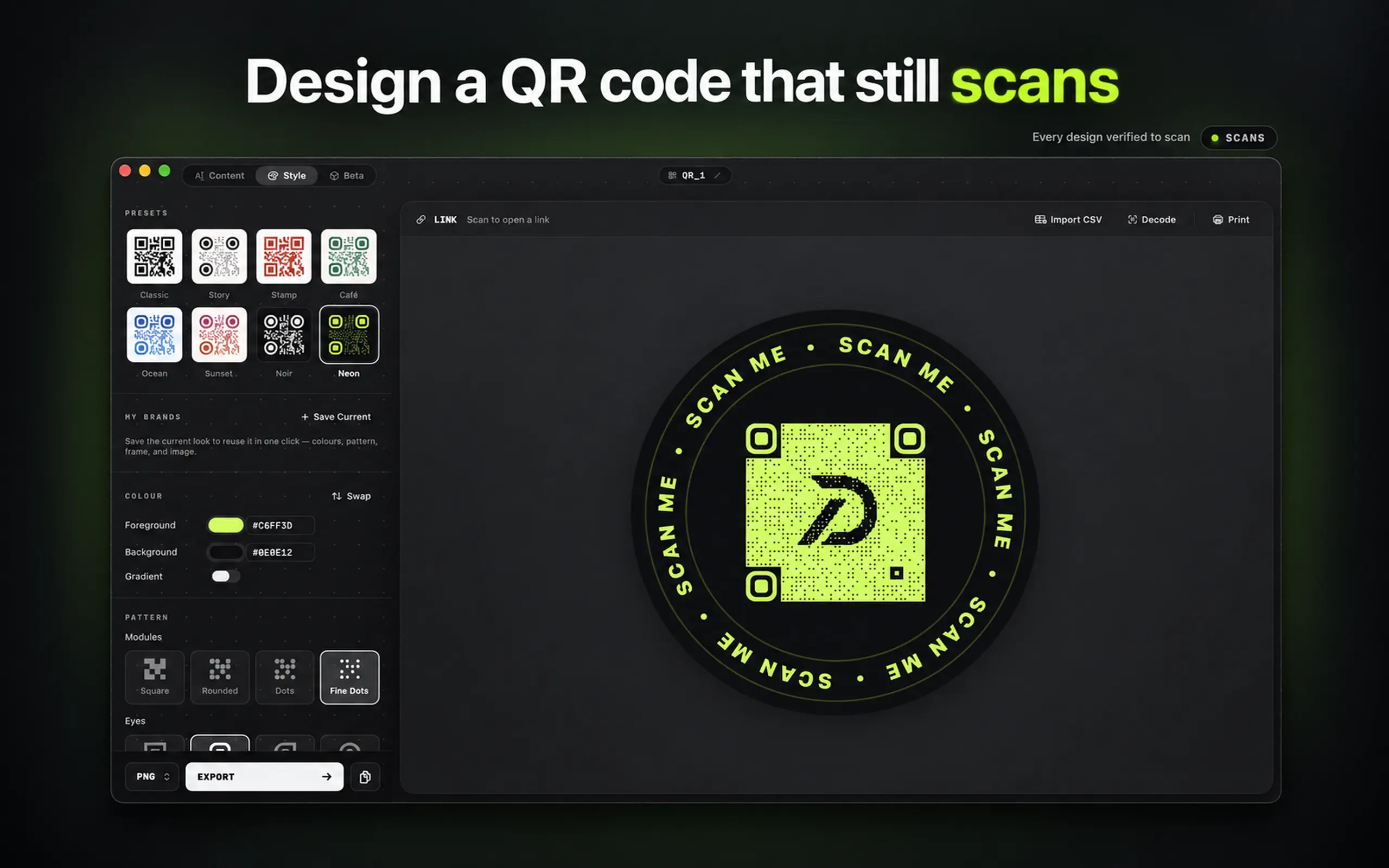
QR Craft is the QR code app DrisH builds at DRISH LABS. It makes nine kinds of code: a link (with optional UTM tracking), text, Wi-Fi, email, phone, SMS, a contact card, a calendar event and a map location. You style it with presets, colours and gradients, module and eye shapes, an outline that shapes the whole code as a circle or a heart, seven frames with captions, and a 3D relief that still scans from straight overhead. A logo gets automatic clearance, or a picture can become the code itself. The Decode tab reads the code in any image, so you can check a design scans before you print it. A CSV becomes a batch of codes with the same styling, and there are print-ready sheets: a Wi-Fi sign, a Scan to Review card and a sticker sheet. Export is PNG up to 4,096 pixels, or SVG and PDF as true vectors. It needs no account and no connection.
- Price: $5.99, one purchase, on the Mac App Store; needs macOS 15.1 or later
- Pick it if: you want branded codes you can design, check and print from one Mac app. Skip it if you print on Avery or DYMO label stock, need CMYK output or command-line generation (QR Factory 3 has those), or need a dynamic code.
QR Craft's page has the screenshots.
iQR codes: the look of the code
iQR codes, by Marek Hrusovsky, is about how a code looks: 18 graphic styles, 15 eye styles and a logo with four overlay options, with a check that the code is still readable as you go. It exports PNG, JPEG, GIF, TIFF, BMP, HEIC, SVG and PDF, and can shorten a link through bit.ly from inside the app. It can also make dynamic codes through its own qr4.at short links, so the destination can be changed after printing; its listing says those links stay valid for life. Batch generation is a $9.99 in-app purchase.
- Price: $14.99 on the Mac App Store, plus $9.99 for batch generation
- Pick it if: a distinctive look matters more than anything else, or you want a changeable code without a monthly fee.
QR Factory 3: labels and bulk
QR Factory 3, from Tunabelly Software, is built for volume: unlimited codes from a CSV file, Avery and DYMO label templates, CMYK, RGB or greyscale output, SVG, PDF and PNG export (plus TIFF and EPS on the Mac), and command-line tools for scripted runs on the Mac. It checks readability as you design, can scan every code after a batch export, and runs on the Mac and iPad.
- Price: free to download; unlocking it costs $4.99 every three months, $14.99 a year, or $29.99 once, for the Mac and iPad together. A separate Enterprise edition is $29.99 on the Mac App Store with every feature included.
- Pick it if: you print codes on labels, in bulk, or from a script.
When you need a dynamic code
If the destination has to change after the code is printed, or you want to count scans, no static code can do it. A dynamic code points at a short link and the service behind it redirects; dynamic QR services usually charge a subscription, and the printed code works only as long as that redirect does. iQR codes is the one-time-purchase option here.
Which to pick
- A plain link or Wi-Fi code, today: Shortcuts, Chrome or the free generator on this site.
- One code with a logo, free: QRCode Monkey.
- Branded codes designed, checked and printed on the Mac, for a one-time $5.99: QR Craft.
- A distinctive look above all: iQR codes.
- Labels, bulk runs or scripts: QR Factory 3.
- A link you'll change after printing, or scan counts: iQR codes' qr4.at links, or a dynamic QR service.
FAQ
What is the best QR code generator for Mac?
For a plain code, the free Create QR Code action in Shortcuts. For branded codes with a logo, frames and a scan check, QR Craft. For labels and bulk runs, QR Factory 3.
How do I make a QR code on a Mac for free?
Use the Create QR Code action in Shortcuts, Chrome's Create QR code for the page you're on, or a free generator in the browser such as the one on this site or QRCode Monkey.
Can I put a logo on a QR code on a Mac?
Yes. QRCode Monkey does it free in the browser, and QR Craft, iQR codes and QR Factory 3 all add a logo. Use a high error-correction level, and scan the code before you print it.
Do QR codes expire?
Static codes don't, because the link or text is stored in the pattern itself. Dynamic codes redirect through a service, and stop working if that redirect is switched off.
Which file format is best for printing a QR code?
SVG or PDF, which are vectors and stay sharp at any size. If you must use PNG, export it large enough that each module is several pixels wide.