Online Teleprompter
- Runs in your browser
- Nothing uploaded
- No sign-up
102 words
A time such as 2:30 or 90s sets the pace to fit the script.
Click the prompter, then: Space plays and pauses · ↑ ↓ change pace · ← → move a line · F fullscreen · M mirror · Home restarts. A presentation clicker or foot pedal works once it is playing: Page Down and Page Up move a third of the screen, F5 plays and pauses, B or . hides the text, Esc pauses.
 Need more than this?
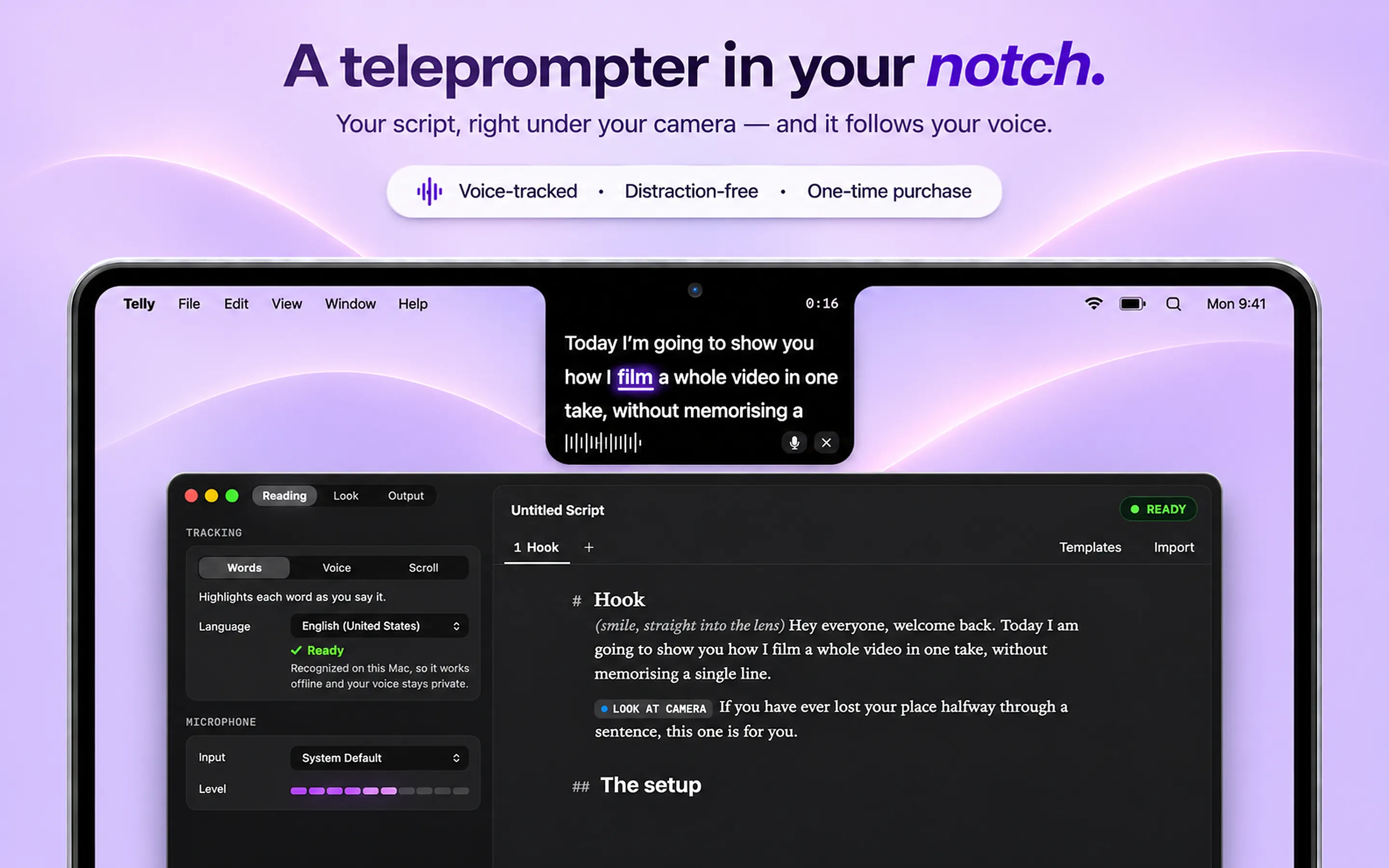
Telly
Puts the script inside the MacBook notch, directly under the camera, and follows your voice word by word, so your eyes stay on the lens and the pace stays yours.
Not today? Get an email when Telly gets better
Updated · DRISH LABS
How do you use a free online teleprompter?
To use a free online teleprompter, paste the script into it and set the pace in words per minute — most people speak at 130 to 160 — or give a finish time and let it fit the pace to the script’s length. Mirroring flips the text for a beam-splitter glass rig, and a presentation clicker or foot pedal that acts as a keyboard can drive it. It does not follow your voice.
How it works
- Paste the script. Line breaks and blank lines are kept, so paragraphs stay paragraphs on screen.
- Set the pace in words per minute, or type a time under Finish in and press Fit pace to have it worked out. Changing the text size or the line width does not change how fast the words go by.
- Press Play. A three-second countdown gives you time to look at the camera, and the text starts on the reading guide near the top of the frame, where your eyes stay closest to the lens.
- Click the prompter to drive it from the keyboard — the shortcuts are listed under it; the arrows change the pace by 10 words a minute. You can also scroll it by hand at any time, and playback carries on from where you left it.
- Once it is playing, a presentation clicker or foot pedal drives it from anywhere on the page: Page Down and Page Up move a third of the screen, F5 plays and pauses, and B hides the text until you press it again.
- Mirror flips the text left to right for a beam-splitter glass rig, and Flip upside down turns it over for a rig that needs it. While it plays, the screen is kept awake where the browser allows it.
Turning words per minute into a scroll rate
A teleprompter that scrolls at a fixed number of pixels per second drifts off pace the moment the text size changes: bigger text means fewer words per screen, so the same pixel rate is fewer words a minute. This one measures the rendered script instead. The text’s height divided by its word count is the average height one word occupies; multiply by the words per second you asked for and you have the pixels per second that deliver that pace — recomputed every frame, so a resize mid-read keeps the pace.
px/s = (WPM ÷ 60) × (text height ÷ word count) · 140 WPM, 300 words ≈ 2:09
When you need it
- Recording a video on a laptop
- Put the prompter in a window just under the webcam, or fullscreen on the same screen, and keep the reading guide near the top. The closer the line you are reading is to the lens, the less your eyes visibly track the text.
- Rehearsing a talk or a pitch
- Type the length of your slot under Finish in and press Fit pace: if the pace it needs is far from how you speak, the script is the wrong length. The time-left readout under the prompter counts down as you read.
- A beam-splitter or tablet rig
- Run it fullscreen on a tablet under a teleprompter glass and turn on Mirror, so the reflection reads the right way round. The screen stays awake while it plays, and a Bluetooth clicker that acts as a keyboard drives it from the camera position.
- Video calls and livestreams
- Open it in a narrow window beside the call. Nobody on the other end sees it, and the keyboard shortcuts work without taking focus away from the conversation for long.
- Presenting in a second language
- Drop the pace to 100 or 110 words a minute and widen the text. Reading at a pace you chose is calmer than reading at the pace a scrolling document happens to move.
Questions
What speed should a teleprompter run at?
Most people speak at 130 to 160 words per minute in a presentation or a video; slower for technical material or a second language. Start at 140 and adjust with the arrow keys while it plays.
Can I use a presentation clicker or a foot pedal?
Yes, if it acts as a keyboard, as most clickers and teleprompter pedals do. Press Play, then Page Down and Page Up move a third of the screen, F5 or Shift-F5 plays and pauses, B or a full stop hides the text, and Esc pauses. A clicker set to send arrow keys moves a line at a time. Keys typed into the script box stay in the script box.
How do I fit a script into a set time?
Type the time under Finish in, such as 2:30 or 90s, and press Fit pace. The pace is set to the words in the script divided by that time. If it would take faster than 260 or slower than 60 words a minute, the page says so: cut or add to the script rather than reading at a pace nobody can follow.
Does it follow my voice?
No. Voice tracking needs microphone access, and this site does not ask any page for it. The script scrolls at the pace you set, and you can pause, speed it up or nudge it from the keyboard.
Does it work on an iPhone or iPad?
Yes, including touch scrolling. iPad Safari supports fullscreen; iPhone Safari does not allow a web page to go fullscreen, so on a phone turn it to landscape and hide the toolbar instead.
Why mirror the text?
A studio teleprompter reflects a screen off an angled sheet of glass in front of the lens, which reverses it. Mirroring the text on the screen puts it back the right way round in the reflection.
Is my script uploaded or saved?
No. It stays in the page while it is open and is gone when you close it. Keep your own copy of anything long.
Can I put the text right under my MacBook camera?
Not from a web page — a browser window cannot sit over the menu bar. That is what the studio’s Mac app, Telly, does: it runs the script inside the notch, directly under the camera.
Keep going
Does Zoom have a teleprompter? A teleprompter for Zoom on a Mac
No, Zoom has no built-in teleprompter.
GuideInvisible teleprompter: how to hide it from screen share on a Mac
An invisible teleprompter stays out of your screen share.
GuideHow to read a script on camera without looking like you're reading
Eyeline, pace and script formatting for reading on camera from a laptop.
Guide