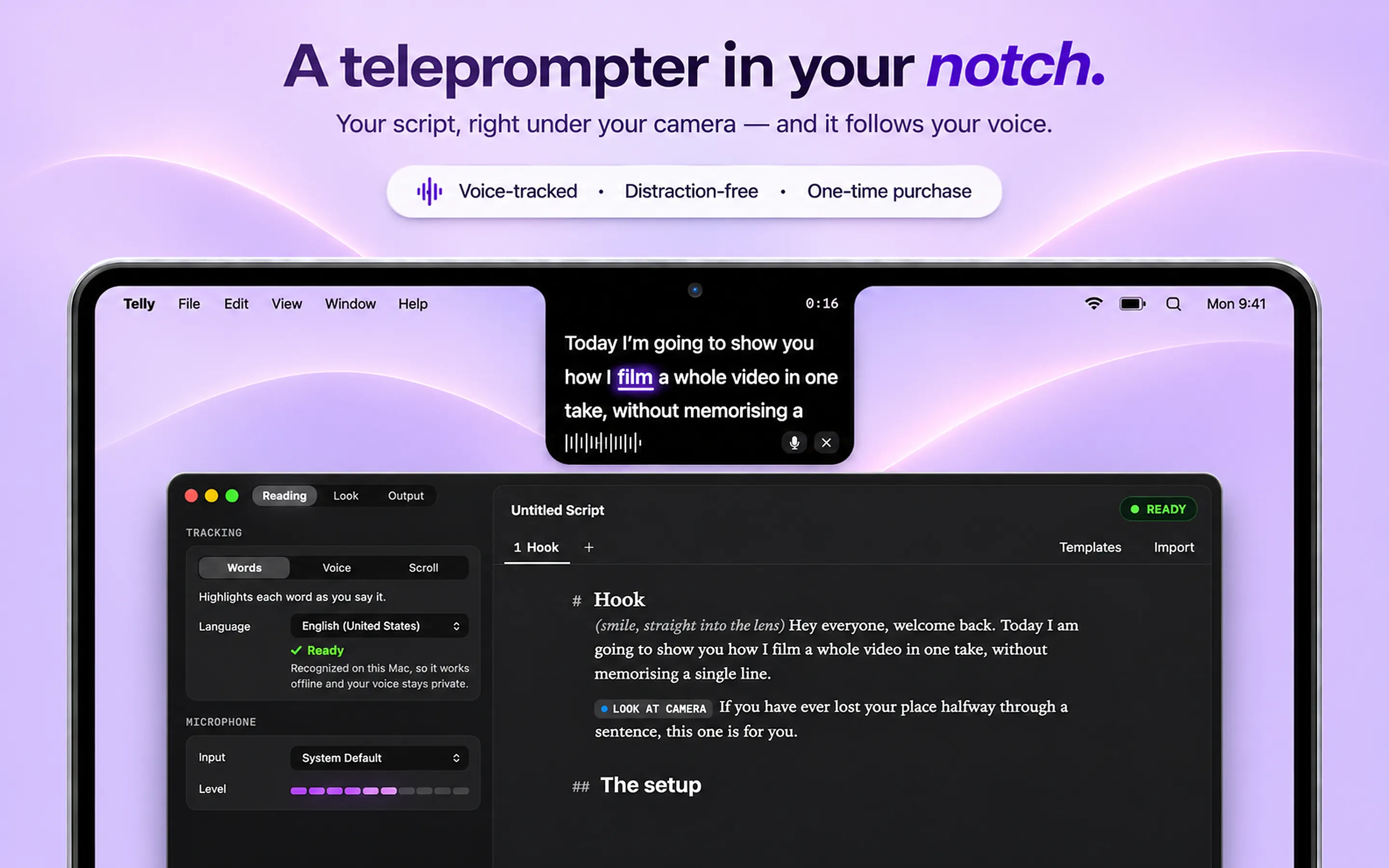
Viewers can tell when you are reading, and your eyes are what give it away: they drift down to the notes, sweep left to right along each line, and come back up a beat late. On a laptop it is worse, because the camera sits above the screen and anything you read sits below it. Below is where to put the text, how fast to move it, how to write it, and what to do about glare in your glasses.
Where should the script go so you look at the camera?
As close to the lens as you can get it. Eyeline matters more than anything else here: text in the middle of a laptop screen is several centimetres below the camera, and at webcam distance that gap reads as looking down.
- Keep the reading area small and high. A narrow column right under the camera, a few words wide, keeps your eyes near the lens and stops the side-to-side sweep that gives reading away.
- Move the window, not your head. Drag the notes up to the top of the screen, directly under the camera, before you start.
- On a MacBook with a notch, the strip of screen beside the camera is as close to the lens as text can get.
- With an external webcam, put the camera where the script is, not the other way round: mount it on top of the screen in the middle, and put a narrow script window directly under it.
A hardware teleprompter solves this completely: a sheet of glass in front of the lens reflects the script from a screen below, so you read straight through the camera. That is what the mirrored mode on teleprompter software is for.
How fast should the script scroll?
At your speaking pace, which for most people on camera is roughly 130 to 160 words per minute. A script that scrolls faster than you talk makes you rush; one that scrolls slower makes you wait mid-sentence, and the waiting shows.
- Start around 140 words per minute and adjust after the first take.
- Slow down for technical material or a language you are less fluent in.
- For a fixed slot (a 30-second ad read, a two-minute intro), work backwards: a 30-second read at 140 words per minute is about 70 words. Cut the script until it fits, rather than speaking faster. Speech length by word count has the times worked out.
A prompter that follows your voice removes the guessing: it moves when you speak and waits when you pause.
How should you write a script you will read aloud?
For the ear first, then format it for the eye. A script that reads well on paper often sounds stiff aloud.
- Short sentences. One idea each. Long sentences make you run out of breath mid-clause.
- Write numbers as you would say them. "About two and a half thousand" is easier to deliver than "2,487".
- Mark the pauses. A line break or a cue such as [PAUSE] gives you permission to breathe where it helps.
- Bold the word you would stress. It stops the flat, read-aloud delivery.
For a ready structure for the opening of a video, see how to write a YouTube intro script; for a script in Hindi, Arabic or another language, see how to use a teleprompter in another language.
Why record in short takes?
Because nobody reads three minutes perfectly. Record a section at a time, restart the section when you stumble, and cut the takes together. A teleprompter that jumps back to the start of the current section with one key makes this painless.
How do I stop my script reflecting in my glasses on camera?
Make the screen less bright and change the angle. The reflection is the screen's light bouncing off your lenses into the camera, so less light and a different angle both shrink it.
- Dim the screen until the script is just readable.
- Light text on a dark background, in a small column rather than a full white page, lights up far less of the screen than black text on white.
- Change the angle. Tilt the screen back a little, or tilt your glasses slightly by lifting the arms off your ears, until the reflection slides out of the camera's view. Check it in the camera preview, not by feel.
- Light your face from the side. A lamp at about 45 degrees to one side brightens your face without putting a second bright patch in your lenses, and a brighter face makes the screen's reflection weaker in comparison.
- Anti-reflective lenses reflect much less to begin with, if you are choosing new ones.
How do I read a script on a video call without it showing?
Keep the script outside what you share. Share one window or a portion of the screen rather than the whole screen, and put the script at the top of the screen, under the camera, outside it. If you need to share your whole screen, use a prompter built to stay out of screen capture, and check it before the call: the capturing app decides whether to honour that. How to hide a teleprompter from screen share has the steps for Zoom, Meet and Teams, and how to read notes on a Zoom call covers slides.
Which tools help?
- Free, in your browser: the teleprompter tool on this site scrolls a pasted script at a set words-per-minute pace, full screen, with a mirror mode for glass. Nothing is uploaded.
- On a Mac, following your voice: Telly, from this studio, puts the script in the notch right under the camera and lights up each word as you say it. When you ad-lib, the highlight holds and picks up where you left off; a Voice-Activated mode scrolls while you speak, and Classic Scroll needs no microphone. It saves the take's transcript as text or SRT captions, and drives a mirror rig on an external display or an OBS scene. With Hide from screen sharing on, the default, it asks macOS to leave the prompter out of shares and recordings; check your own call app first (how to check). It is $24.99, one purchase on the Mac App Store, needs macOS 26 or later, and its interface is in English. For camera setups, see teleprompter for YouTube on a Mac.
FAQ
How fast should a teleprompter scroll?
At your speaking pace: roughly 130 to 160 words per minute for most people. Start at 140 and adjust.
How do I make eye contact on a laptop video?
Put what you are reading as close to the camera as possible, in a narrow column at the very top of the screen, and look at the lens between lines.
Where should I put my script on a MacBook so I look at the camera?
At the very top of the screen, right under the camera. On a MacBook with a notch, the strip beside the notch is the closest text can get to the lens; a notch teleprompter puts the script there.
How do I stop my script reflecting in my glasses on camera?
Dim the screen, show the script as light text on a dark background in a small column, and tilt the screen or your glasses slightly until the reflection leaves the camera's view. Anti-reflective lenses reflect much less to begin with.
How many words is a one-minute script?
About 130 to 160 words at a natural speaking pace.
Why does a teleprompter need a mirror mode?
Hardware teleprompters reflect the screen off angled glass, which flips the text. Mirror mode flips it back so it reads correctly in the reflection.
Can a teleprompter follow my voice instead of scrolling at a fixed speed?
Yes. Voice-tracked teleprompters such as Telly listen as you read and keep the script in step with you.