Below is how we compared, what matters when choosing, then each option with the facts from its own App Store page or website, read on 24 November 2026, and where Telly loses. Prices and features change, so check the page before you buy. Telly is made by DRISH LABS, the studio behind this site; the others are not.
How we compared
- Sources. Each app's own website, help pages or Mac App Store listing (US store, US dollars), read on 24 November 2026. Words in quotes are the developer's. Store ratings are left out: a rating is not a test.
- Which apps. Mac apps whose main job is showing a script to read aloud, plus two services that run in the browser. Video editors and recording studios with a prompter tucked inside are left out, except Takes, which is a teleprompter first.
- What we did not do. We have not run every app here through the same script; the facts below are what each developer says. To check the one that matters to you, run the two-minute voice test in a free tier before you pay.
- Our bias. DRISH LABS makes Telly. Every app gets the same columns in the table, and the section after it says where another app is the better pick.
What matters when choosing
- Does it follow your voice? A fixed-speed scroll is always slightly wrong for the sentence you are on. Voice tracking comes in two kinds: speak-to-scroll moves while it hears you and stops when you pause; word tracking matches what you say to the script and knows the exact word you are on. Ask what happens when you ad-lib: does it wait for you, or jump?
- Where does the text sit? On a laptop the camera is above the screen, and anything you read pulls your eyes down. A prompter in the notch, or in a narrow strip under the camera, keeps your eyeline on the lens.
- Does it hide from screen sharing? On a call or a screen recording, a prompter in an ordinary window ends up in the shot. Several Mac prompters exclude themselves from screen capture, though it depends on the capturing app; see how to hide a teleprompter from screen share.
- How you pay. One purchase, a subscription, or free with in-app purchases. A subscription earns its keep when it brings cloud sync, a team workspace or other devices.
- Privacy. The App Store's privacy label says what the developer collects. For voice tracking, also check where speech is recognised: on the device, or on a server.
- Languages. Two different questions: which languages the interface is in, and which languages it can follow by voice.
- Outputs and remotes. A second display with mirrored text for beam-splitter glass, OBS, a phone as a monitor, a hardware remote or a game controller, keyboard shortcuts that work from other apps.
- Your macOS version. Requirements range from macOS 13 to macOS 26 across these apps.
The options
Telly: word tracking in the notch, holds when you ad-lib
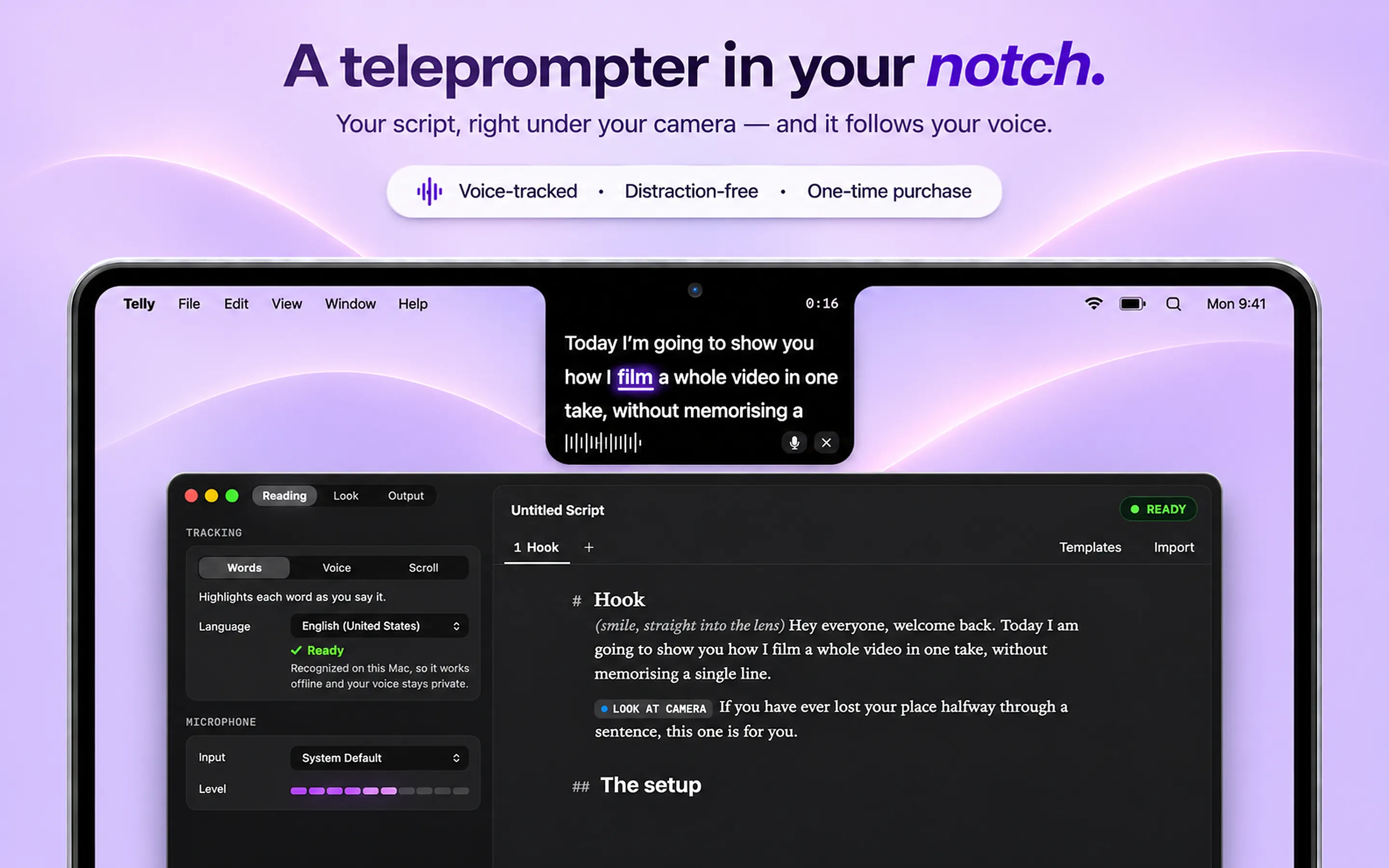
Telly shows the script in the notch at the top of the screen, right under the camera, or in a floating window. In Word Tracking, each word lights up as you say it; when you go off script, the highlight holds and picks up where you left off. There is also a Voice-Activated mode that scrolls while you speak and stops when you pause, and Classic Scroll, which needs no microphone and can finish in a set time.
- Hidden from screen sharing: built for it, and on by default; Telly asks macOS to leave the prompter out of shares and recordings, and the capturing app decides, so check yours first (how). One switch turns it off.
- Languages: dozens of speech languages, most recognised on the device after a one-time download per language, a few through Apple's speech service; each page can have its own listening language, and mixed Hindi and English, right-to-left Arabic and Hebrew, Chinese, Japanese and Thai are supported. The interface is in English.
- Outputs and remotes: an external display with mirror flip and type up to 140 pt; the prompter on a phone or tablet through a QR code; an OBS browser source in chroma green, chroma blue or transparent; global shortcuts and
tele://links. Saves the take's transcript as text or SRT captions. - Scripts: opens PDF, DOCX, RTF, Markdown, text and the presenter notes of a PPTX; 15 templates.
- Privacy: Data Not Collected; no account.
- Price: $24.99, one purchase, on the Mac App Store.
- Requires: macOS 26 or later.
- No notch needed: on a Mac without one, the script sits at the top centre of the screen; a floating window goes under an external webcam.
- Where others are stronger: it is Mac only, with no cloud sync or team library, and it needs the newest macOS. Textream is free; Teleprompter Pro+ runs on older macOS and supports hardware remotes.
Textream: free and open source
Textream is a free, MIT-licensed teleprompter for Mac, with a separate free app for iPhone and iPad. On Mac it pins the script below the notch, in a floating window or full screen, with three modes: Word Tracking (the default, highlighting each word as you say it), Voice-Activated and Classic. Its GitHub page lists hiding from screen recordings and video calls, an external display with a mirror mode for rigs, a remote view in any browser on the local network, and a Director Mode where someone else writes and pushes the script.
- Price: free, open source
- Requires: macOS 15 Sequoia or later
- Privacy: its README says recognition runs on the device: "No cloud, no latency, works offline"
- Pick it if: you want word tracking in the notch for free, or want to read and change the code. It is the honest first thing to try.
Mootch: free word tracking on macOS 14
Mootch is free on the Mac App Store, with no in-app purchases listed. Its Smart mode uses Whisper on the device to "highlight the exact word you are on"; Simple mode plays and pauses the scroll by volume. It docks under the notch and, in its words, "stays hidden from screen shares on Zoom, Meet and Teams".
- Price: free
- Requires: macOS 14 or later
- Pick it if: you want word tracking for nothing on a Mac that can't run macOS 15.
Elgato Virtual Prompter: free under the camera
Elgato's Virtual Prompter comes in Elgato Studio 2.0 (released 3 November 2026). Its Docked mode keeps the script just below your camera with Voice Sync included, and is "free with no time limits"; Floating placement needs Virtual Prompter Pro. Voice Sync can be tuned "from strict, word-for-word tracking to a looser follow", in 8 languages. A Notch mode appeared in a September beta but is not in the 2.0 release notes, and its pages don't say whether it hides from screen sharing.
- Price: Docked free; Pro $2.99 a month, $29.90 a year or $49.99 once
- Requires: macOS 15 or later, or Windows 11
- Pick it if: you want a free prompter under the camera on a Mac or a PC, or already use Elgato gear.
Notchie: a focused notch prompter
Notchie sits in the notch. Its own site says it "follows along word by word as you talk"; its App Store listing, still at version 2.1 from 1 January 2026, describes scrolling with keyboard shortcuts and doesn't mention voice. The overlay "is excluded from screen sharing in supported apps", and the listing promises "No accounts, no tracking, no data collection".
- Price: $29.99 on the Mac App Store
- Requires: macOS 14.6 or later
- Interface: English
- Pick it if: you want a minimal notch prompter on an older macOS.
CueNotch: notch, folders and a rehearsal coach
CueNotch follows your voice word by word in the notch ("Every word you say is matched to the script"), with Ghost Mode to stay out of screen shares. It imports PowerPoint, PDF, Word and Markdown, keeps scripts in folders, has a Rehearsal Coach for pace and posture, and an interface in 10 languages. Its own page warns that "a few apps and macOS versions ignore" Ghost Mode.
- Price: free for 3 starts a day and scripts of up to 100 words; Pro $7.99 a week or $29.99 once
- Requires: macOS 14 or later
- Pick it if: you rehearse a lot, keep many scripts, or want the menus in your language.
Tellie: word tracking, one price
Tellie hangs from the notch. Its Pro version "tracks your words, not your speed" in more than 40 languages, with Apple's on-device speech recognition, and it says it is "invisible to screen recording, Zoom, Meet, and FaceTime". The free version is a steady-scroll notch prompter.
- Price: free; Pro $29 once for up to 3 Macs, with a 10-day trial
- Requires: macOS 14 or later, Apple silicon
- Pick it if: you want word tracking on macOS 14 for one price.
Avocado: a free notch prompter, voice in Pro
Avocado opens in the notch and is free as a prompter. Voice scrolling, which "moves when you speak" and "waits when you pause", is part of Pro, with 3 Pro sessions a week free; a word-by-word mode is in testing for English. It says it is hidden from screen shares and recordings, and it has an iPhone and iPad app.
- Price: free; Pro $7.99 a month or $79.99 a year
- Requires: macOS 14 or later
- Pick it if: you want the same prompter on your iPhone and iPad.
GoTeleprompter: Mac, iPhone, iPad and the web
GoTeleprompter advances the script "as your words match the text", with Apple's on-device speech recognition, and its Voice Follow is free for up to 2 scripts. One subscription covers iPhone, iPad and Mac. It keeps the prompter out of shares "in apps that respect it".
- Price: free for 2 scripts; Pro is a subscription (its pages don't give the price)
- Requires: macOS 26 or later
- Pick it if: you read from an iPhone or iPad as well as the Mac.
ShareSpeak: Mac and Windows, one price
ShareSpeak sits in the MacBook notch, follows your voice in languages written with spaces, and lets you pick the speech engine: Apple's, Whisper offline, or Google's Gemini with your own key. It says it stays out of shares and recordings in Zoom, Teams, Meet, Loom and OBS, and it takes clickers and foot pedals while its window is focused.
- Price: $14.99 once, for 2 devices
- Requires: not stated (Whisper needs Apple silicon and macOS 15)
- Pick it if: you present from Windows as well as a Mac.
GlassCue: the lowest one-time price
GlassCue scrolls "along with you, pausing when you pause", and "disappears from screenshots, screen recordings, and screen sharing" in apps that use the system's capture. Presenter clickers work: Page Up and Page Down change sections, and B plays or pauses. Its pages don't mention the notch.
- Price: $9.99, one purchase
- Requires: macOS 15 or later
- Pick it if: you present with a clicker and want to spend the least.
Takes: free, and it records
Takes is free and open source. The script hangs from the notch and scrolls as you speak ("Go off script, and the text waits"), and Takes records the camera and the screen at the same time. Its prompter stays out of its own recordings; its maker says "we have not tested Zoom or Meet".
- Price: free, open source
- Requires: macOS 15 or later, Apple silicon
- Pick it if: you want the prompter and the recorder in one free app.
Teleprompter Pro+: remotes, folders and a rig
Teleprompter Pro+, from Teleprompter Apps Ltd, has a Mac App Store page that describes timed scrolling; it does not describe voice tracking. Its strengths are elsewhere: hardware and game-controller remotes, folders for scripts, export, and Siri and Shortcuts.
- Price: free to download, with in-app purchases from $3.99 to $159.99 and a $14.99-a-year subscription
- Requires: macOS 13 or later
- Interface: 10 languages
- Privacy: its App Store privacy label lists purchase history, email address, name, user content and user ID as linked to you, and usage data as not linked
- Pick it if: you run a rig with a handheld remote or a game controller, organise many scripts in folders, or are on an older macOS.
VoicePrompter: voice tracking on every device
VoicePrompter matches your words against the whole script as you speak, so you can ad-lib, skip ahead or backtrack. It has a free, open-source web app (34 languages, scripts kept on the device, no account) and native apps for Mac, iPhone, iPad and Android, which track 60+ languages on Apple devices. On Mac, its window is excluded from screen capture. Its page does not mention the notch.
- Price: web app free; the native apps are free to try with up to 3 custom scripts, then $9.99 a month, $49.99 a year or $99.99 once
- Requires: macOS 15 or later, Intel or Apple silicon
- Pick it if: you move between a Mac, a phone and an Android device, or want voice tracking in a browser.
Speakflow: teams and every device
Speakflow is a script and teleprompter service for teams: real-time collaboration, comments, workspaces and collaborator seats. It runs in the browser, with desktop apps for Mac and Windows on the paid plans and mobile apps that sync. Its Flow voice-activated scrolling is unlimited on paid plans; the free plan includes 10 minutes a month.
- Price: Free; Plus $15 a month, Premium $35 a month, Studio $89 a month, each billed yearly
- Pick it if: several people write and deliver the scripts. For a team, it does what no notch app does.
A free browser teleprompter
If you read a script a few times a month, the free teleprompter on this site may be enough: paste a script, set the pace in words per minute, go full screen and mirror it for glass. Nothing is uploaded and there is no sign-up. It scrolls at a steady pace and does not listen to your voice.
Side by side
Read from each app's own page on 24 November 2026.
| App | Price | Follows your voice | Under the camera | Hidden from screen sharing | Platforms | macOS |
|---|---|---|---|---|---|---|
| Telly | $24.99 once | Word tracking, holds on ad-libs | Notch | Asks macOS, on by default | Mac | 26+ |
| Textream | Free, open source | Word tracking | Notch | Yes | Mac; separate iPhone and iPad app | 15+ |
| Mootch | Free | Word tracking, or play and pause by volume | Notch | Yes, Zoom, Meet, Teams | Mac | 14+ |
| Elgato Virtual Prompter | Docked free; Pro from $2.99/mo | Voice Sync, strict to loose | Docked under the camera; notch only in a beta | Not stated | Mac, Windows | 15+ |
| Notchie | $29.99 | Site: word by word; listing: keyboard scroll | Notch | Yes, in supported apps | Mac | 14.6+ |
| CueNotch | Free tier; $29.99 once or $7.99/wk | Word tracking | Notch | Yes, Ghost Mode | Mac | 14+ |
| Tellie | Free; Pro $29 once | Word tracking (Pro) | Notch | Yes | Mac (Apple silicon) | 14+ |
| Avocado | Free; voice in Pro from $7.99/mo | Speak-to-scroll (Pro, 3 sessions a week free) | Notch | Yes | Mac, iPhone, iPad | 14+ |
| GoTeleprompter | Free for 2 scripts; Pro subscription | Word matching | Under the camera | Yes, in apps that respect it | Mac, iPhone, iPad, web | 26+ |
| ShareSpeak | $14.99 once | Word tracking | Notch | Yes | Mac, Windows, iPhone | Not stated |
| GlassCue | $9.99 once | Scrolls with you, pauses when you pause | Not described | Yes, in apps using the system's capture | Mac | 15+ |
| Takes | Free, open source | Waits when you go off script | Notch | Not tested on calls by its maker | Mac (Apple silicon) | 15+ |
| Teleprompter Pro+ | Free + in-app, $14.99/yr | Not described | Not described | Not described | Mac | 13+ |
| VoicePrompter | Free web; native free to try | Word matching, ad-libs and skips | Not described | Yes, on Mac | Web, Mac, iPhone, iPad, Android | 15+ |
| Speakflow | Free; from $15/mo | Yes (10 min/mo free) | Not described | Not described | Web, Mac, Windows, mobile | Not stated |
| Browser teleprompter | Free | No | Where you put it | No | Any browser | Any |
Where Telly loses
Telly is our app, so here is where another one is the better pick, from the same pages:
| If you need | Telly | Pick instead |
|---|---|---|
| It free | $24.99, one purchase | Textream, Mootch or Takes; Elgato's Virtual Prompter in Docked mode |
| An older macOS | macOS 26 or later | Mootch, CueNotch, Tellie or Avocado (14+); Textream, VoicePrompter or GlassCue (15+); Teleprompter Pro+ (13+) |
| iPhone, iPad, Android or Windows | Mac only | VoicePrompter, GoTeleprompter, Avocado or Speakflow; ShareSpeak or Elgato on Windows |
| A clicker, foot pedal or game controller | Keyboard and global shortcuts only | Teleprompter Pro+; GlassCue or ShareSpeak for clickers |
| Recording in the same app | Records nothing: use QuickTime, OBS or your camera | Takes |
| A shared team library | Script files on your Mac | Speakflow |
| Menus in your language | English only | CueNotch or Teleprompter Pro+ (10 languages each) |
How to choose
Recording alone on a MacBook, talking to camera: a notch prompter with word tracking. Try Textream first, since it is free. Telly is the pick if you want all of this in one app for one price: a highlight that holds when you ad-lib, dozens of speech languages mostly recognised on the device, outputs for a rig and OBS, captions from the take, and a Data Not Collected label.
Free: Textream or Mootch for word tracking in the notch, Takes if you also want it to record, Elgato's Virtual Prompter for a free docked prompter on a Mac or a PC.
On an older macOS: Notchie (14.6+), Textream (15+) or Teleprompter Pro+ (13+). Telly needs macOS 26.
A team, or Windows and Android as well: Speakflow for a shared workspace; VoicePrompter for voice tracking on every device.
A rig with a hardware remote: Teleprompter Pro+.
Now and then: the free browser teleprompter, then move up when chasing a steady scroll starts to show in your takes.
For the reading itself, see how a teleprompter works, how to read a script on camera without looking like you're reading and how to write a YouTube intro script. By need: voice-activated teleprompters, notch teleprompters, free teleprompters, hiding a prompter from screen sharing, Teleprompter Pro alternatives and a teleprompter in Hindi, Arabic or another language. By setup: reading notes on a Zoom call, Keynote's presenter notes, PowerPoint's Teleprompter view, a teleprompter in OBS, recording for YouTube on a Mac and a mirror rig or Elgato Prompter.
FAQ
What is the best teleprompter app for Mac?
For one person recording on a MacBook, a notch teleprompter that follows your voice keeps your eyes near the camera and the pace yours: Textream and Mootch are free; Telly's highlight holds on ad-libs, and it adds on-device speech in dozens of languages and rig and OBS outputs for one price. For teams or several devices, Speakflow or VoicePrompter.
Is there a free teleprompter for Mac?
Yes. Textream is free and open source, with word tracking in the notch, and Mootch is free with word tracking on macOS 14. Takes is free and records too, Elgato's Virtual Prompter is free in Docked mode, VoicePrompter's web app is free, and the browser teleprompter on this site is free with a steady scroll.
What is a voice-activated teleprompter?
One that listens as you read. The simple kind scrolls while it hears you and stops when you pause; a word-tracking prompter matches what you say to the script, so it knows the exact word you are on.
Can a teleprompter stay hidden on Zoom or in a screen recording?
Many say they can: Telly, Textream, Mootch, CueNotch, Tellie, Notchie and VoicePrompter's Mac app among them. It depends on the capturing app honouring the request, so check from a second device; see how to hide a teleprompter from screen share.
Do I need a subscription for a Mac teleprompter?
No. Telly, Notchie, Tellie, GlassCue and ShareSpeak are one purchase, and Textream, Mootch and Takes are free. A subscription makes sense when it brings cloud sync, a team workspace or other devices.
Which Mac teleprompter works in other languages?
Check two things: the interface languages and the speech languages. Teleprompter Pro+ has an interface in 10 languages; Telly's interface is English, but it follows dozens of speech languages, most on the device. VoicePrompter lists 60+ tracking languages on Apple devices.