That is the whole idea. The rest of this page explains each part, the kinds of prompter you will meet, and how the scrolling is controlled, so you can pick the one that suits how you record.
The glass: why the camera can't see the words
A camera teleprompter has three parts: a screen lying flat (or tilted up) under the lens, a piece of beam-splitter glass set at about 45 degrees in front of the lens, and a hood that blocks light from behind.
- The glass is partly reflective. Seen from the front, where you stand, it reflects the screen below it, so you read the script floating in front of the lens.
- From behind, the glass is see-through. The camera sits in the dark hood and looks through the glass at you. Light from the screen bounces away from the lens, so the words are not in the shot.
- The reflection flips the text. A mirror image reads backwards, which is why most teleprompter apps have a mirror or flip setting: the screen shows the script reversed, and the glass turns it the right way round.
Because the words sit directly over the lens, your eyes point at the camera the whole time you read. That is the effect every other kind of prompter tries to imitate.
The stand prompters at a podium
The pair of glass panes either side of a lectern at a speech work the same way, without a camera behind them. Each pane reflects a screen on the floor or inside the stand, so the speaker reads the same script on either side and the audience sees only clear glass. When a speaker turns from one pane to the other, the script is waiting on both. The speech version of this is often called a conference prompter.
Software teleprompters on a laptop or phone
Most people reading on camera today have no glass at all. A teleprompter app shows the script on the same screen as everything else, and the work it does is about where the text sits and how it moves.
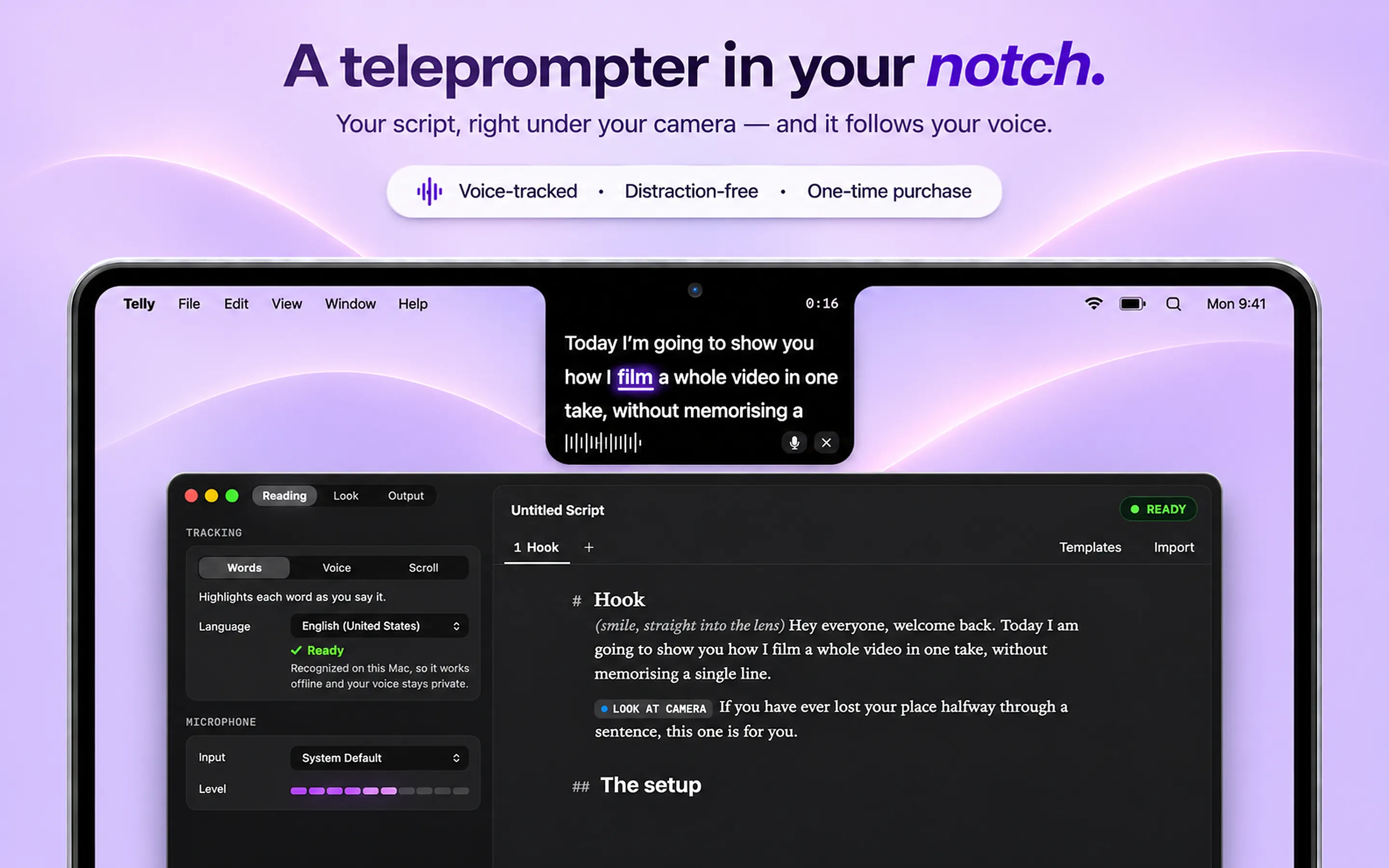
- Where it sits. A laptop camera is above the screen, so anything you read pulls your eyes down. The trick is a narrow strip of text at the very top of the screen, directly under the lens, a few words wide so your eyes do not sweep side to side. On a MacBook with a notch, the band of screen beside the camera is as close to the lens as text can get, and several Mac prompters put the script there.
- What viewers see. On a video call or a screen recording, an ordinary window can end up in the share. Some prompters exclude their window from screen capture, so you can share the whole screen and the script still stays off it.
- On a phone or tablet, the same app can feed a hardware rig: the device lies under the glass, and the mirror setting does the flip.
For the placement and pacing tips in detail, see how to read a script on camera without looking like you're reading.
How the scrolling is controlled
The words have to move at the pace you speak, and there are three ways to make that happen.
Method 1: A human operator
In a TV studio, an operator watches the presenter and speeds the scroll up or slows it down with a hand control. It is still the most forgiving way: the operator waits when you pause and catches up when you rush.
Method 2: A fixed speed, or a set time
Most apps scroll at a steady speed you choose, usually set in words per minute. A common planning figure is 130 to 150 words a minute, so 140 is a good place to start and adjust after the first take. Some apps work the speed out for you from a target time: tell them the read must last 60 seconds and they pace the script to finish then.
The weakness is that a steady scroll is always slightly wrong for the sentence you are on, and when you stumble and restart a line, the script carries on without you.
Method 3: Voice-activated scrolling
A voice-activated teleprompter listens through the microphone. There are two kinds:
- Speak-to-scroll. The text moves while it hears you and stops when you go quiet. It knows you are talking, not which word you said.
- Word tracking. Speech recognition turns what you say into words and matches them against the script, so the app knows the exact word you are on. It highlights that word and keeps the next lines in view. Go back a sentence and it goes back too; pause to breathe and it waits.
Word tracking only works as well as the speech recognition behind it, so it depends on the language and on a clear microphone. Ad-libs are the hard case: words that are not in the script give the tracker nothing to match.
Which kind do you need?
- Reading a few times a month: a fixed-speed prompter in the browser is enough. The free teleprompter on this site scrolls a pasted script at a words-per-minute pace, full screen, with a mirror mode for glass, and nothing is uploaded.
- Recording yourself on a MacBook: a prompter that sits under the camera and follows your voice keeps your eyes on the lens and the pace yours.
- A studio camera or a podium: beam-splitter glass, with software that can mirror the text and drive a separate display.
Telly, the teleprompter DRISH LABS makes for Mac, is the word-tracking kind. It shows the script in the notch at the top of the screen, right under the camera, and lights up each word as you say it. When you go off script, the highlight holds and picks up where you left off. It also has a Voice-Activated mode that scrolls while you speak, and a Classic Scroll that needs no microphone and can finish in a set time. For a rig, it drives an external display with mirror flip and type up to 140 pt. It needs macOS 26 or later. To weigh it against the other options, see the best teleprompter apps for Mac.
FAQ
How does a teleprompter work with a camera?
The camera sits behind a sheet of angled beam-splitter glass. A screen under the glass shows the script mirrored, the glass reflects it the right way round toward the speaker, and the camera films through the glass without seeing the words.
Why is teleprompter text mirrored?
Because the glass reflects it. A reflection reads backwards, so the screen shows the script reversed and the reflection turns it the right way round. Software prompters have a mirror setting for exactly this.
How does a voice-activated teleprompter know where I am?
The simple kind scrolls while it hears sound and stops when you pause. A word-tracking prompter uses speech recognition to match what you say to the script, so it knows the exact word you are on and can follow you back or wait.
Can the audience see the teleprompter?
Not on a glass prompter: from the audience side or the camera side, the glass looks clear. On a video call, a prompter in an ordinary window can appear in a shared screen, unless the app hides itself from screen capture.
Do I need special hardware to use a teleprompter?
No. On a laptop, a prompter app with the text placed right under the camera gives most of the effect. Glass and a separate screen matter when the camera is a real camera on a tripod rather than the one in your laptop.