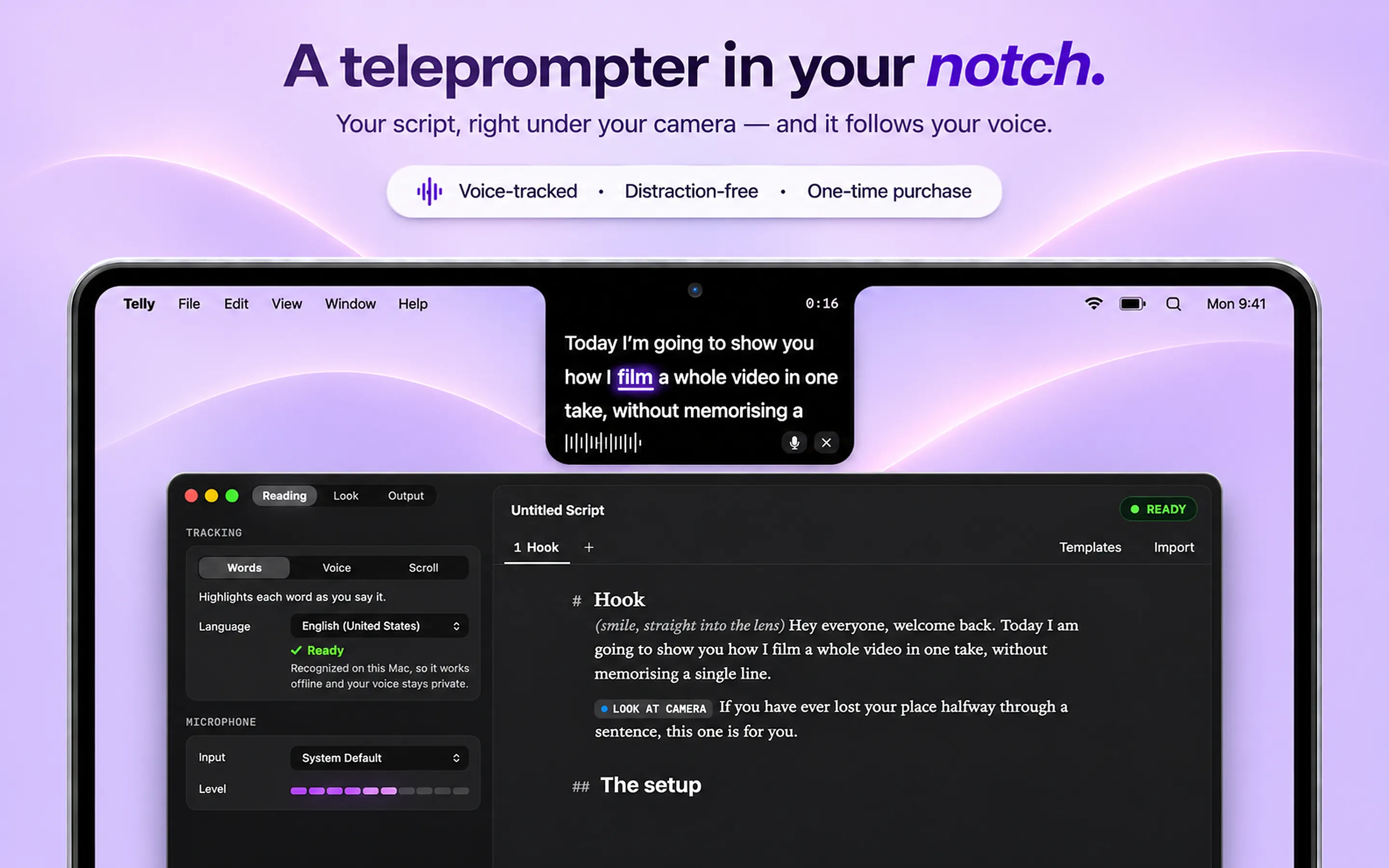
Below is how the notch placement works and what happens on a Mac without a notch or with the new Dynamic Island, then the apps side by side with the facts from their own pages, alternatives to Notchie and CueNotch, and how to set one up. Telly is made by DRISH LABS, the studio behind this site; the others are not.
Why the notch
A MacBook camera sits in the notch above the screen. Any text lower down pulls your eyes off the lens, and viewers see you looking down. The band of screen around the notch is as close to the camera as text can get, so a short strip of words there keeps your eyeline almost on the lens.
Two things make it work:
- A short, narrow strip. A few words per line, so your eyes do not sweep from side to side.
- The text moves for you. Most notch apps scroll by voice, so the line you are reading stays in the same place under the camera.
No notch?
On a Mac without one (an older MacBook, an iMac, a Mac mini with a monitor), Telly pins the strip at the top centre of the screen, under where the webcam usually sits, and labels this style Top instead of Notch. Other apps differ, so check before you buy. With an external webcam, put the camera at the top centre of the display you read from.
The MacBook Pro with the Dynamic Island. Apple's 14- and 16-inch MacBook Pro announced on 28 October 2026 brings the Dynamic Island to the Mac, as "the home for Spotlight, Live Activities, and Siri AI", and ships with macOS 27 (Apple Newsroom). Notch apps were built around the notch, and the Dynamic Island shows its own content in the same spot. If you have one of these Macs, check how a notch app sits around the Dynamic Island before you rely on it, and try its floating window if the two collide.
The notch apps side by side
Read from each app's own page or Mac App Store listing on 24 November 2026. These are the developers' descriptions, not a test of ours; prices and features change, so check before you buy.
| App | Price | Follows your voice | Hidden from screen sharing | macOS | Also on |
|---|---|---|---|---|---|
| Telly | One purchase | Word tracking that holds on ad-libs; speak-to-scroll; fixed scroll | Asks macOS to leave it out, on by default; check your call app | 26+ | Mac only |
| Textream | Free, open source (MIT) | Word tracking; speak-to-scroll; fixed scroll | Yes | 15+ | A separate free iPhone and iPad app |
| Mootch | Free | Word tracking (Smart mode); play and pause by volume (Simple mode) | Zoom, Meet and Teams | 14+ | Not stated |
| Takes | Free, open source | "Go off script, and the text waits" | Out of Takes' own recordings; "we have not tested Zoom or Meet" | 15+, Apple silicon | Records the camera and screen |
| NotchPrompter | Free on GitHub; $4.99 on the Mac App Store | Speak-to-scroll ("Scrolls when you speak, pauses when you stop") | "Invisible to recording" | 14+ (14.6 on the App Store) | Not stated |
| CueNotch | Free (3 starts a day, 100 words); $29.99 lifetime or $7.99 a week | Word tracking | Ghost Mode | 14+ | Not stated |
| Avocado | Prompter free; voice scrolling in Pro ($7.99 a month or $79.99 a year), 3 Pro sessions a week free | Speak-to-scroll; word by word in Voice Labs (English) | Yes | 14+ | iPhone and iPad |
| Tellie | Free steady scroll; Pro $29 once, up to 3 Macs | Word tracking, in Pro | Zoom, Meet, FaceTime and screen recording | 14+, Apple silicon | Not stated |
| Notchie | $29.99 | Its site: "follows along word by word"; its App Store listing (version 2.1) describes keyboard scrolling | "In supported apps" | 14.6+ | Not stated |
| ShareSpeak | $14.99 once, 2 devices | Word tracking, choice of speech engine | Zoom, Teams, Meet, Loom and OBS | Not stated | Windows; free iPhone app |
| Moody | $29 once | Speak-to-scroll ("When you pause, it pauses") | Yes | 14.7+ | A window by the camera; no notch claim on its page |
| Elgato Virtual Prompter | Docked free; Floating in Pro ($2.99 a month, $29.90 a year or $49.99 once) | Voice Sync, strict to loose | Not stated | 15+ | Windows. Notch placement appears only in a beta (see below) |
Elgato's notch mode. Elgato's macOS release notes for the Elgato Studio 2.0 Beta 3 (10 September 2026) list the prompter "in Display, Floating or Notch mode"; the 2.0 release notes of 3 November describe only Docked and Floating (release notes). Until a release lists it, treat the notch mode as a beta feature.
Where each one stands out, on its own pages:
- Textream gives word tracking in the notch for free, plus a browser remote, a Director Mode for someone else to push the script, and an external display with mirroring. Its README says recognition runs on the device, with no cloud.
- Mootch is free with no in-app purchases listed, and tracks words on the device with Whisper.
- Takes is the one that records: it films the camera and the screen while you read from the notch.
- NotchPrompter offers an OpenDyslexic font and global shortcuts.
- Notchie's listing promises "No accounts, no tracking, no data collection", and it runs on macOS 14.6.
- CueNotch imports PowerPoint, PDF, Word and Markdown, has script folders and a Rehearsal Coach, and an interface in 10 languages. Its own page warns that "a few apps and macOS versions ignore" its Ghost Mode.
- Avocado adds an iPhone and iPad app and pacing marks from Apple Intelligence (macOS 15.1 and Apple silicon).
- Tellie follows more than 40 languages on the device and sells Pro once for up to three Macs.
- ShareSpeak runs on Windows as well as Mac and supports clickers and foot pedals.
- Telly adds a highlight that holds when you ad-lib, dozens of speech languages with a listening language per page, an external display with mirror flip, an OBS browser source and a phone remote.
Which one to pick
- You want it free: Textream, Mootch or Takes. If you only need a steady scroll, the free browser teleprompter on this site works too; put its window at the top of the screen.
- You are on macOS 14 or 15: Mootch, CueNotch, Avocado, Tellie, NotchPrompter or Notchie; Textream and Takes need macOS 15. Telly needs macOS 26.
- You also use Windows: ShareSpeak.
- You go off script a lot, or record in more than one language: Telly's highlight holds through an ad-lib, and each page can have its own listening language.
- You need hardware remotes or an iPhone rig: none of these is built for it; see the Teleprompter Pro alternative guide for the app that is.
Notchie alternatives
Notchie is $29.99, and its App Store version is still 2.1, from 1 January 2026; the listing describes keyboard scrolling, while its own site describes word-by-word voice following. If you want word tracking you can confirm before paying, try Textream or Mootch (free), CueNotch's free tier, or Tellie's 10-day Pro trial. For a highlight that holds when you ad-lib and a listening language per page, Telly is one purchase. On macOS 14, Mootch, CueNotch, Avocado and Tellie run where Notchie does.
CueNotch alternatives
CueNotch's free tier allows three starts a day and scripts of up to 100 words, and Pro is $7.99 a week or $29.99 once. If you want no limits for free, Textream, Mootch and Takes have none. If you would rather pay once, Tellie ($29), Telly and Notchie are one purchase. CueNotch keeps the edge on its Rehearsal Coach, script folders and an interface in 10 languages.
How to set up a notch teleprompter (Telly)
- Open your script, or paste it. Telly opens PDF, DOCX, RTF, Markdown and text, and the presenter notes of a PPTX.
- On the Look tab, under Window, set Style to Notch (it reads Top on a Mac without a notch). Floating gives you a draggable window instead, for a webcam that is not at the top centre.
- Set Display to Follow Mouse if you move between your MacBook and a monitor (the strip moves to the display your pointer is on), or Fixed to keep it on one screen.
- Adjust Width, Height and Text size until about five to eight words fit on a line.
- On the Reading tab, choose Word Tracking and the language of your script, then press Start Take (⌘Return) and read.
Hide from screen sharing is on by default (Output›Recording): Telly asks macOS to leave the prompter out of shares and recordings. Check your call app once before you rely on it, as in the tip below.
Telly's limits: macOS 26 or later, an English interface, Mac only, and no hardware remotes beyond the keyboard (global shortcuts work from other apps).
Tips for reading from the notch
- Sit at your normal distance. The farther you are from the screen, the less your eye movement shows.
- Keep lines short. A wide strip makes your eyes sweep, which reads as reading.
- Check before a call. Do a 10-second test recording with the prompter showing to confirm it stays out; see how to hide a teleprompter from screen sharing.
For the voice side in depth, see voice-activated teleprompters for Mac. For every kind of Mac prompter, not only notch apps, see the best teleprompter apps for Mac.
FAQ
What is a notch teleprompter?
A Mac app that shows your script in the band around the MacBook notch, right next to the camera, so your eyes stay near the lens while you read.
Is there a free notch teleprompter?
Yes. Textream is free and open source, with word tracking in the notch, and needs macOS 15 or later. Mootch is free on the Mac App Store and runs on macOS 14; Takes is free and records the take too. NotchPrompter's code is also open source on GitHub.
Does a notch teleprompter work on a Mac without a notch?
Telly does: it places the strip at the top centre of the screen instead, under where a webcam usually sits, and calls that style Top. Check each other app's page.
Does a notch teleprompter work on the MacBook Pro with the Dynamic Island?
The Dynamic Island shows its own content where notch apps put the script, so check how your app sits around it before a take, and use its floating window if they overlap.
What is a good alternative to Notchie or CueNotch?
Textream, Mootch and Takes are free with no limits. Tellie and Telly are one purchase. See the two sections above.
Can people on a call see a notch teleprompter?
Most of these apps say they hide from screen sharing. It depends on the capturing app honouring it, so do a short test recording first.
Does a notch teleprompter work with an external monitor?
Yes, if your camera sits at the top of that monitor. In Telly, set Display to Follow Mouse or Fixed to choose the screen.