Below is what each kind does, a two-minute test to run before you commit to one, the Mac apps side by side with the facts from their own pages, and how to set up voice tracking in Telly. Telly is made by DRISH LABS, the studio behind this site; the others are not.
The three kinds of "voice" scrolling
- Speak-to-scroll (voice-activated). The script moves while the microphone hears you and stops when you go quiet. It knows you are talking, not what you said, so it cannot follow you back a line or skip ahead with you. Mootch's Simple mode and Avocado's standard voice scrolling work this way.
- Word tracking. Speech recognition turns your voice into words and matches them against the script, so the app knows the exact word you are on. It can highlight that word, wait when you pause, and jump when you skip. Telly, Textream, Tellie, CueNotch, GoTeleprompter, VoicePrompter and Mootch's Smart mode say they work this way.
- Fixed scroll. No microphone at all: a steady speed in words per minute, or a speed worked out from a target time. Still the right choice for a noisy room or a script the recogniser cannot follow.
Most apps that say "voice-activated" in their name mean one of the first two. Read the description for words like "word by word", "matches your words" or "highlights each word" to tell word tracking apart. Elgato's Voice Sync sits between the two: you set it "from strict, word-for-word tracking to a looser follow".
A two-minute test before you pick one
Test with your own voice and microphone: start with a free app or a free tier, and run the same test on a paid one as soon as you have it. Use a script of about 300 words and try four things:
- Pause for five seconds mid-sentence. The script should stop, not drift on.
- Skip a sentence. A word tracker should jump to where you are; speak-to-scroll will be a line behind.
- Go back and re-read a line. Does the highlight follow you back?
- Ad-lib for 20 seconds, saying things that are not in the script, then return to it. The good ones hold their place and pick up again; the weak ones jump to a random line that shares a word with what you said.
Then turn off Wi-Fi and try once more. If it stops working, its speech recognition runs on a server.
The Mac apps side by side
Read from each app's own page or Mac App Store listing on 24 November 2026. These are the developers' descriptions, not a test of ours, and prices and features change, so check before you buy.
| App | Kind | Ad-libs and skips (its own words) | Speech on the device | Voice languages | Price | macOS |
|---|---|---|---|---|---|---|
| Telly | Word tracking, plus speak-to-scroll and fixed modes | Holds when you ad-lib, picks up when you return | Most languages, a few use Apple's service | Dozens, one per page | One purchase | 26+ |
| Textream | Word tracking, plus speak-to-scroll and fixed modes | Not described | "No cloud, no latency, works offline" | "Dozens of languages" | Free, open source | 15+ |
| Mootch | Word tracking (Smart mode, Whisper) or speak-to-scroll (Simple mode) | Not described | "Runs entirely on-device" | Not stated | Free | 14+ |
| Elgato Virtual Prompter | Voice Sync, strict to loose | Not described | Not stated | 8 | Free in Docked mode; Floating needs Pro ($2.99 a month, $29.90 a year or $49.99 once) | 15+ (also Windows) |
| VoicePrompter | Matches against the whole script | Follows ad-libs and skips, scrolls backwards | On-device in the Apple apps | 60+ on Apple devices | Web app free; native apps free for 3 scripts, then $9.99 a month, $49.99 a year or $99.99 once | 15+ |
| Tellie | Word tracking ("tracks your words, not your speed"), in Pro | "Skip a line or go off script and it finds you" | "Apple's on-device speech" | 40+ | Free steady scroll; Pro $29 once | 14+, Apple silicon |
| GoTeleprompter | Word matching | "The script waits until you continue" | Apple's on-device recognition | Apple's on-device languages | Free for 2 scripts, Voice Follow included; Pro subscription | 26+ |
| Avocado | Speak-to-scroll; word by word in Voice Labs (English) | "It waits when you pause" | On-device Apple speech | Not stated | Voice in Pro ($7.99 a month or $79.99 a year), 3 Pro sessions a week free | 14+ |
| CueNotch | Word tracking ("Every word you say is matched to the script") | "Finds your place if you skip" | "Listens locally" | Not stated | Free tier; $29.99 lifetime or $7.99 a week | 14+ |
| Notchie | Its site: "follows along word by word"; its App Store listing (version 2.1) describes keyboard scrolling | Not described | "Runs entirely locally" | English | $29.99 | 14.6+ |
| PromptSmart Pro | Word tracking (VoiceTrack) | "Will hold your place" off script | "Does not require the internet" | English | $29.99 plus in-app purchases | 13+ (the iPad app, on an M1 Mac or later) |
| ShareSpeak | Word tracking, choice of Apple, Whisper or Gemini engine | Not described | Whisper "runs offline" | Languages written with spaces | $14.99 once (2 devices) | Not stated (also Windows) |
| Teleprompter.com | VoiceGlide, pauses and resumes | "Picks up exactly where you left off" | "Runs entirely on-device" | 28 | Free with watermark; Pro $7.50 a month billed yearly | 12+ |
One that does not follow your voice: Teleprompter Pro, one of the best-known names, scrolls at a set speed. Its own captions guide says the feature "does not use voice recognition" (guide, read 24 November 2026), and its Mac App Store description doesn't mention voice. It is strong elsewhere, with hardware remotes and an iPhone and iPad app; see the Teleprompter Pro alternative guide for when it is still the right pick.
The free way first
- Textream is the honest first thing to try. It is free and MIT-licensed, sits under the notch, and has the same three modes as Telly, including word tracking. It needs macOS 15 or later.
- Mootch is free on the Mac App Store, with word tracking on the device and a notch placement, and runs on macOS 14.
- Elgato's Virtual Prompter is free in its Docked mode, under the camera, with Voice Sync included; it comes in Elgato Studio and needs macOS 15. Floating placement is paid.
- VoicePrompter's web app is free and open source and runs in a browser, so it works on any Mac. The native apps add more languages.
- Speakflow's free plan includes 10 minutes of voice scrolling a month (pricing), enough to find out whether you like reading this way.
- No voice at all: the free teleprompter on this site scrolls at a words-per-minute pace in a browser tab, with nothing uploaded.
How to set up voice tracking in Telly
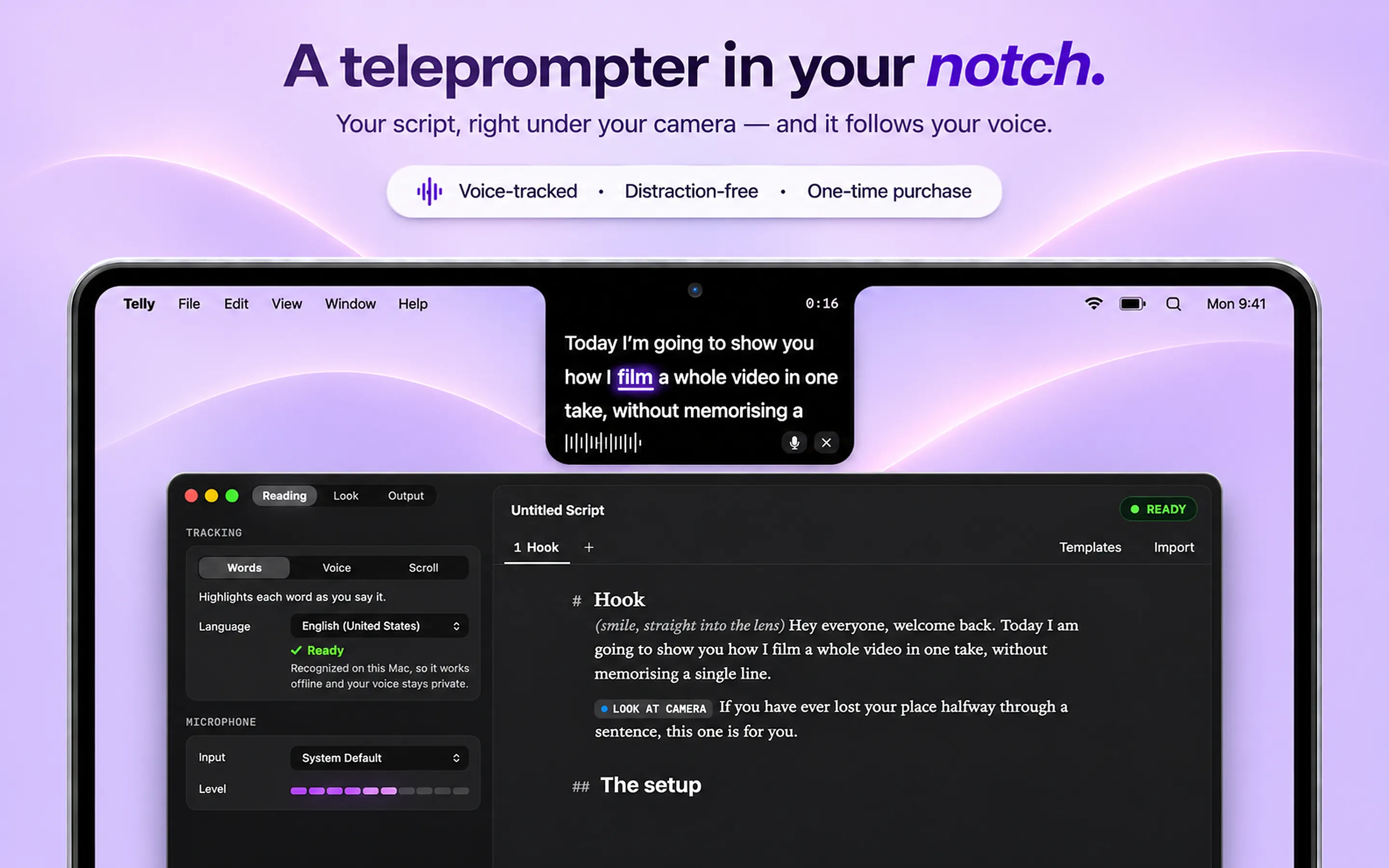
Telly shows the script in the notch at the top of the screen, right under the camera, and lights up each word as you say it.
- Paste or open your script. Telly opens PDF, DOCX, RTF, Markdown and text files, and the presenter notes of a PPTX.
- On the Reading tab, choose Word Tracking, and set the listening language to the language the script is written in.
- Pick your microphone and speak: the level meter should move. If it stays flat, Telly is listening to a different input.
- Press Start Take (⌘Return). The first time, press Continue on Telly's permission sheet and allow the microphone when macOS asks.
- After the 3-2-1 countdown, read. Space pauses, Esc ends the take.
When you go off script, the highlight holds after a few words that are not in the script, then picks up where you left off when you come back. Most languages are recognised on your Mac after a one-time download per language; a few use Apple's speech service and need a connection. If a page will not track (a noisy room, a language the recogniser struggles with), switch to Voice-Activated or to Classic Scroll, which needs no microphone and can finish in a set time.
Where Telly is weaker: it needs macOS 26 or later, the newest requirement here along with GoTeleprompter; its interface is in English; it is Mac only; and Textream and Mootch give you word tracking in the notch for free. Telly's case is the highlight that holds on ad-libs, a listening language per page, on-device speech in dozens of languages, outputs for a rig and OBS, and a Data Not Collected label, in one purchase.
Getting cleaner tracking from any app
- Use a microphone close to your mouth. A headset or a lavalier hears you over the room; the built-in microphone also hears the fan and the keyboard.
- Write the script the way you say it. Numbers as words ("twenty twenty-six"), no abbreviations you would expand aloud.
- Keep stage directions out of the read. In Telly,
# headingsand (stage directions in brackets) are shown but never expected aloud, and[CUES]show as badges.
For where to put the words and how fast to read, see how to read a script on camera without looking like you're reading. For how recognition and scrolling work under the hood, see how a teleprompter works, and for the wider field, the best teleprompter apps for Mac.
FAQ
What is a voice-activated teleprompter?
A teleprompter that listens through the microphone and moves the script as you speak. The simple kind scrolls while it hears you; a word-tracking prompter matches what you say to the script, so it knows the exact word you are on.
Is there a teleprompter that follows your voice for free on a Mac?
Yes. Textream is free and open source, with word tracking under the notch, and needs macOS 15 or later. Mootch is free with word tracking on macOS 14, Elgato's Virtual Prompter is free in its Docked mode with Voice Sync, VoicePrompter's web app is free in any browser, and Speakflow's free plan includes 10 minutes of voice scrolling a month.
Does Teleprompter Pro follow your voice?
Not according to its own pages, read on 24 November 2026: it scrolls at a set speed, and its captions guide says the feature does not use voice recognition.
Does a voice teleprompter need the internet?
It depends on the app and the language. Several Mac apps recognise speech on the device. Telly recognises most languages on your Mac after a one-time download; a few use Apple's speech service.
What happens when I ad-lib?
A speak-to-scroll prompter keeps moving while you talk, so it runs ahead. A word tracker has nothing to match; the better ones hold their place until you return to the script. Test it with 20 seconds of off-script talk before you buy.
Which voice teleprompter works in Hindi, Arabic or other languages?
Check the voice languages, not the interface languages. Telly follows dozens of speech languages with a listening language per page; VoicePrompter lists 60+ on Apple devices, Tellie 40+, and Elgato's Voice Sync 8. See how to use a teleprompter in another language.