Below are the free setups for Zoom with Keynote, PowerPoint and a browser teleprompter, the Zoom App option, Google Meet and Teams, then where a dedicated Mac prompter saves time. For keeping a script out of a screen share, app by app and how to check it, see how to hide a teleprompter from screen share.
How do I read notes on Zoom without anyone seeing them?
Share a window, not your screen. Whatever is inside what you share, everyone sees; whatever is outside it, only you see. So the whole trick is choosing what to share.
In the Zoom app on a Mac:
- Click Share in the meeting controls.
- On the Screens tab, select the one application window you want to show (hold Shift to pick more than one), then click Share.
- Or, on the Advanced tab, choose Portion of Screen. A green border marks what is shared, and you can drag its sides and corners to resize it.
Your notes now go anywhere outside that window or border. Put them at the top of the screen, right under the camera, so your eyes stay near the lens. If you're not sharing anything at all and only talking on camera, nothing on your screen is visible to the call.
If you share your entire screen, your notes are in the share too, unless the app showing them hides itself from screen capture and Zoom honours that. How to hide a teleprompter from screen share explains how that works and how to check it before the call.
How do I see Keynote presenter notes on a Zoom call?
Play the presentation in a window, with the presenter display in a separate one, and share only the slideshow window. It is the cleanest free setup on a single screen. Apple's steps:
- Choose Keynote›Settings, go to the Slideshow tab, and make sure Show presenter display window in other applications is unchecked.
- Choose Play›In Window, then click Play in the toolbar. The slideshow and the presenter display open in separate windows.
- If the presenter display doesn't appear, move the pointer to the top of the slideshow window and click Show Presenter Display, or choose Play›Show Presenter Display in Window.
- In Zoom, click Share, choose the Keynote slideshow window, and click Share.
Your presenter notes stay in the presenter display, which you can drag up under the camera. Apple adds one warning: some video apps always show the presenter display if it sits inside the shared screen area. Sharing the slideshow window rather than the whole screen avoids that.
How do I see PowerPoint notes while sharing on Zoom?
With two displays, use Presenter View; with one screen, play the slides in a window and share only that window.
With two displays, choose Slide Show›Presenter View: your notes appear in a pane on the right on your screen, and only the slides appear on the other display. The font buttons at the lower left of the Notes pane make the notes bigger. In Zoom, share the display showing the slides; if the two end up the wrong way round, Presenter View has a Swap Displays option.
With one screen, Zoom's own advice is to play the slides in a window and share only that window:
- On the Slide Show tab, choose Set Up Slide Show.
- Under Show type, choose Browsed by an individual (window), then click OK.
- On the Slide Show tab, choose Play from Start.
- In Zoom, click Share, select the PowerPoint window, and click Share.
The slides are now one window among others, so a notes document or a prompter window beside it stays off the call.
Is there a free teleprompter for Zoom?
Yes: any prompter in a window you don't share. For a script rather than slide notes, the free Online Teleprompter on this site runs in a browser tab. Paste the script, set the pace in words per minute, and press Play; a three-second countdown gives you time to look at the camera. Open it in a narrow window just under the webcam.
It scrolls at the pace you set rather than following your voice, and it won't be seen by the call as long as you share a single window or a portion of the screen that leaves it out. For pace, eyeline and how to write a script for reading aloud, see how to read a script on camera without looking like you're reading.
Is there a teleprompter inside Zoom?
Not from Zoom, but its App Marketplace has one. PitchHub describes itself as "a professional teleprompter built directly into Zoom for Meetings, Webinars, and Video Recordings". It is a third-party app, not part of Zoom: the listing offers a five-day free trial, and its pricing page lists Standard at $134.99 a year and Premium at $299 a year (read 24 November 2026). It needs the Zoom desktop app 7.0.5 or later. It suits you if every call you make is on Zoom; it does nothing in Meet or Teams.
Does Google Meet have a teleprompter?
No. Two free ways to read on a Meet call:
- Presenting Google Slides. In some Google Workspace editions you can present Slides from inside Meet and open your speaker notes there with Show/Hide speaker notes; Google says you need a computer with Chrome or Edge (Google's steps, read 24 November 2026).
- Reading a script. Share A window or A tab rather than Your entire screen, and keep the script outside it: the same rule as Zoom.
Does Microsoft Teams have a teleprompter?
No, but PowerPoint Live in a Teams meeting shows you your notes: in Microsoft's words, "Presenters can deliver slides while viewing speaker notes, meeting participants, reactions, and chat in a single view" (Microsoft, read 24 November 2026). For a script rather than slides, choose a single Window rather than a Screen when you share, and keep the script outside it. To record yourself with notes instead of presenting live, PowerPoint's recording tools have a Teleprompter view on Windows and Mac: see does PowerPoint have a teleprompter.
When is a Mac teleprompter worth it for Zoom?
When arranging windows every call gets old, or a fixed-speed scroll keeps tripping you up. The free setups work, with those two costs.
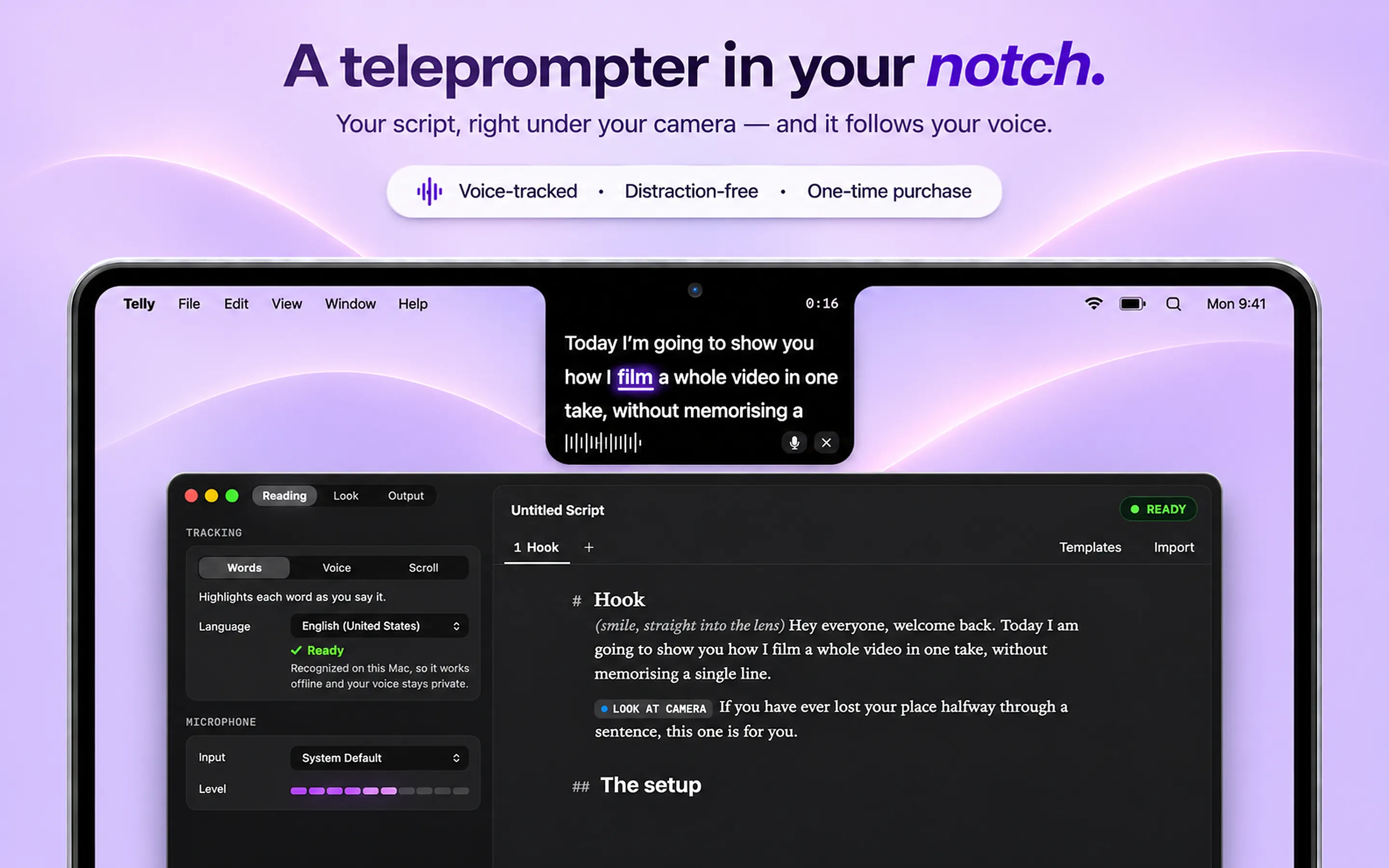
Telly is the Mac teleprompter from this studio, and it removes both:
- Built to stay out of the share. With Hide from screen sharing on, the default, Telly asks macOS to leave the prompter out of screen sharing and recordings, so you can share your whole screen. Zoom does the capturing, so check it once before the call: look at your share from your phone, or make a ten-second QuickTime screen recording and play it back (how to check).
- It follows your voice. Each word lights up as you say it; pause, skip ahead or re-read and it keeps up, and when you go off script the highlight holds until you come back. A constant-speed mode is there too.
- Right under the camera. The script sits in the notch area of a MacBook screen, the closest text can get to the lens. On a Mac without a notch it sits at the top centre of the screen, or in a floating window under an external webcam.
- Your existing script. It opens PDF, DOCX, RTF, Markdown and plain text, and the presenter notes of a PPTX.
Its limits: it's Mac only, and it's a prompter rather than a slide presenter (you still share slides from Keynote or PowerPoint). It follows dozens of speech languages, most recognised on your Mac after a one-time download, and its interface is in English. It is $24.99 on the Mac App Store, a one-time purchase, and needs macOS 26 or later.
If you want to compare it with other Mac prompters first, see the best teleprompter apps for Mac. Recording rather than presenting live? PowerPoint has its own recording teleprompter: see does PowerPoint have a teleprompter.
FAQ
Does Zoom have a built-in teleprompter?
No. Zoom's meeting app has no teleprompter of its own. PitchHub, a third-party Zoom App, adds one inside the meeting for a yearly fee; or keep your script in a window outside what you share, for free.
Is there a teleprompter for Zoom on a Mac?
Yes, several. A Mac teleprompter in the notch, or any prompter in a window you don't share, works with the Zoom app on a Mac. PitchHub runs inside Zoom itself.
How do I see my notes while sharing a PowerPoint on Zoom with one screen?
Set the show type to Browsed by an individual (window) under Slide Show › Set Up Slide Show, play the slides, and share only the PowerPoint window. Anything outside that window, including your notes, stays private.
Can people on Zoom see my presenter notes?
Only if the notes are inside what you share. Share a single window or a portion of the screen, not the entire screen, and keep the notes outside it.
How do I keep Keynote's presenter notes off a Zoom call?
In Keynote › Settings › Slideshow, uncheck Show presenter display window in other applications, play the presentation in a window, and share the slideshow window in Zoom.
Do Google Meet and Microsoft Teams have a teleprompter?
No. Meet can show your speaker notes when you present Google Slides from inside it, in some Workspace editions; Teams shows them in PowerPoint Live. For a script, share a single window and keep the script outside it.
Will a teleprompter show up when I share my screen on Zoom?
A teleprompter in an ordinary window will if you share the entire screen. Some Mac prompters, Telly among them, are built to hide themselves from screen sharing; check from a second device, because it depends on Zoom honouring the request.