

What is PageForge?
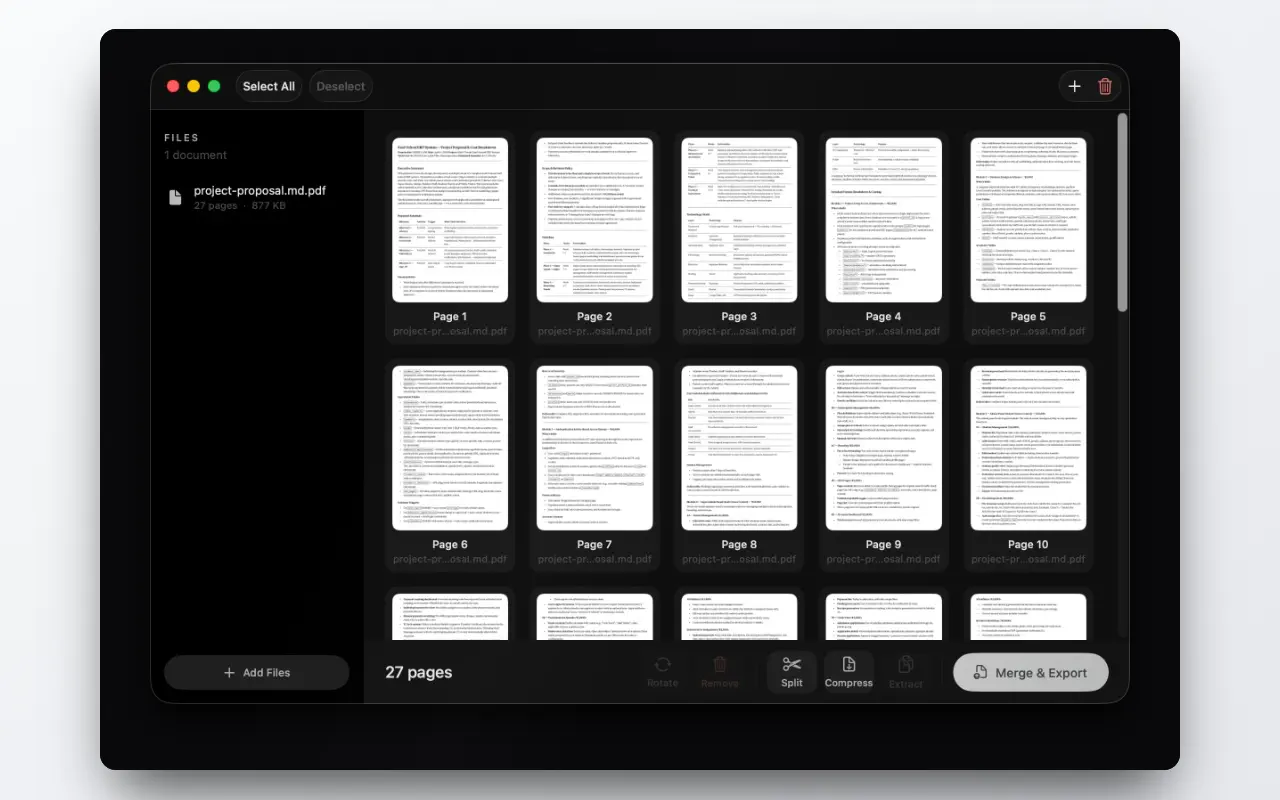
PageForge is a native macOS app for the everyday PDF jobs: merging several files into one, splitting a big one by page range, compressing something too large to email, rotating pages that scanned sideways, and pulling a few pages out into a new document.
It is a one-time purchase, it works entirely offline, and it does not ask for an account.
The problem
Almost nobody needs a PDF editor. What people actually need, several times a month, is one of about five operations — and the software market has decided those five operations are worth a subscription.
The options today:
- Adobe Acrobat — does everything, priced accordingly, and a monthly bill for a job you do twice a month
- Free web tools — fast and genuinely convenient, and every one of them requires uploading the document first
- Preview — can merge and reorder if you know the trick with the thumbnail sidebar, and cannot compress or split by range
- Command line —
qpdfand Ghostscript will do all of it, if you write shell
The web tools are the interesting case, because that is what most people reach for. They work. The problem is what you are handing over: a signed contract, a bank statement, a passport scan, a client's confidential deck — uploaded to a server you know nothing about, in exchange for shaving 3 MB off a file.
What it does
- Merge — combine any number of PDFs into one, in whatever page order you arrange
- Split — break a document into separate files by page range
- Compress — shrink oversized PDFs, with a straightforward trade between file size and quality
- Rotate and organise — fix sideways pages, delete the ones you do not need, drag to reorder
- Extract — pull selected pages into a brand-new PDF, leaving the original untouched
How it works
PageForge is built on the PDF frameworks macOS already ships, which is why it is small, fast, and produces files that behave correctly everywhere afterwards — no re-encoding, no unusual output that only opens properly in the app that made it.
Everything happens locally. There is no upload, so there is no wait for one, and no server anywhere holding a copy of your document. It is light and dark mode, keyboard shortcuts, drag and drop, and then it gets out of the way.
Who it is for
- Anyone who assembles documents for submission — applications, claims, filings, invoices
- Freelancers merging a contract, a scope and an invoice into a single PDF for a client
- Students combining scanned pages into one file for upload
- Anyone who has hit an "attachment too large" wall and needed the file smaller in the next two minutes
Real scenarios
The form that wants one file. A portal accepts a single PDF, and you have six scans, two exports and a photo. Merge, reorder, export once.
The 40 MB attachment. A deck that will not send. Compress it, choose the quality trade you can live with, send it.
The chapter, not the book. Somebody needs pages 41 to 58 of a 300-page report and does not need the other 282. Split by range and send exactly that.
The scan that came out sideways. Every page rotated ninety degrees because of how the sheet fed. Rotate all, export, done.
Why I built it
I wanted to compress a document with something on it that I would not have uploaded to a stranger's server, and realised that was the same reason I had felt vaguely uneasy every previous time I had done exactly that.
That is the whole product thesis. The features are not novel — every one of them exists in a dozen tools. What is different is that the file never leaves the machine, and that you pay once rather than renting the capability.
Alternatives and how it compares
- Adobe Acrobat — the complete product, and the correct choice if you genuinely need PDF editing. Subscription-priced and heavy for five operations.
- Smallpdf, iLovePDF and similar — excellent, free at low volume, and they require the upload. That is the trade.
- Preview — already installed and free. Merges and reorders; will not split by range or compress.
- PDF Expert — a strong Mac app with a much wider scope, at a higher price.
PageForge is the narrow one: the five jobs, natively, offline, once.
FAQ
Does compressing damage the pages?
Compression is a trade and the app makes you choose which side of it you want. Text stays sharp; the size comes out of embedded images.
Are my documents uploaded anywhere?
No. There is no server involved at any point, and no account to create.
Is it a subscription?
No. One purchase.
Does it run natively on Apple Silicon?
Yes.
Can it fill in or sign forms?
No. That is PDF editing, and this is deliberately not a PDF editor.